
Simplify Access Management module offers an intuitive solution for managing user permissions within yoursystem. This module allows administrators to define and control access rights across different models, fields, menus, and actions, ensuring that users have appropriate access based on their roles and responsibilities.
Key Features
Model Access Control: Define permissions for creating, editing, deleting, viewing, and exporting records within specific models.
Field-Level Security: Set visibility and edit permissions for individual fields within forms and views.
Menu and Action Restrictions: Hide or restrict access to specific menus, submenus, and actions based on user roles.
Domain-Based Access: Apply domain filters to limit record access for users, enhancing data security.
Button and Tab Management: Control the visibility of buttons and tabs within forms to streamline user interfaces.
Read-Only User Mode: Designate users as read-only to prevent modifications while allowing data viewing.
Chatter Access Control: Manage visibility and interactions within the chatter for specific users.
Multi-Company Support: Configure access rights tailored to different companies within a multi-company setup.
Benefits
Enhanced Security: Restrict access to sensitive data and functionalities, reducing the risk of unauthorized actions.
Improved User Experience: Simplify user interfaces by displaying only relevant options, leading to increased efficiency.
Centralized Management: Manage all access control settings from a single interface, streamlining administrative tasks.
No Technical Expertise Required: Configure access rights without the need for coding or technical knowledge.
Scalability: Easily adapt and scale access control settings as your organization grows and evolves.


 Last Updated : 22 APR 2026 (v19.0.3.0.0)

All In One Access Management app for setting the correct access rights (Hide/Unhide/Read-only)
on fields, models, menus, records, filters, groups, buttons/tabs, views, actions, reports, chatter for
any module, any user, any company. This app lets you control what users can see and do, all from
one place, with just a few clicks. No need for technical skills or complex setups.


Save 80%
customization time

Multi user &
company support

No technical
knowledge required

Multi
lingual support

Features

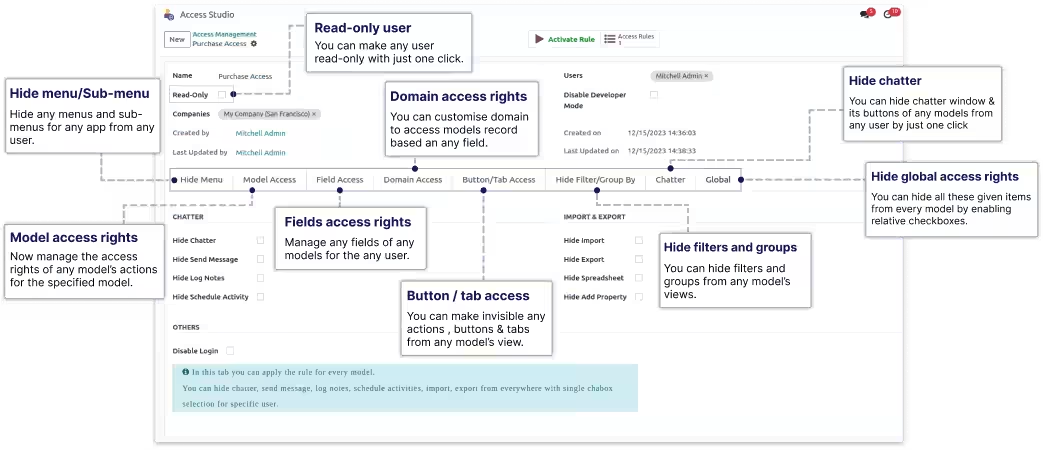
Hide menu/Sub-menu

Model access rights

Fields access rights

Domain access rights

Button / tab access

Hide filters and groups

Chatter access rights

Hide global access rights

Read-Only User

Disable developer mode

Hide Import / Export

Disable login

Company Wise Restrictions

Hide Duplicate / Archive

Restrict reports & actions

Hide Views

Make any field required

Hide Chatter activities/notes

Restrict external links

Restrict Kanban fields

Restrict exporting fields

Manage hierarchy
access


Restrict Create /
Create & Edit

Field conditional
access

Soft restriction on
domain

Hide search panel
button

Button/Tab
conditional access
This
icon indicates Advanced Access Management features, which
is a separate app that works with Simplify Access Management.

Benefits of access management

Restrict user-specific access privileges for any models, including Create, Edit, Delete, Actions, Archive/
Unarchive Duplicate, and Export, for the given user.
You can disable developer mode for any user.
This module also inhibits the ability to install, uninstall, or update any module.
You can restrict any user's access permissions to model-specific parts (Send Message, Log Notes, Activities).
You can turn off the import-export feature for any user.
Restrict user access permissions to prevent specified users from seeing any module's navigation menus and submenus.
It will also be restricted from using Script/XMLRPC.
It enables you to individually hide the chatter.
Multi-Languages
We have added some languages (English, German / Deutsch, Arabic, Spanish / Espanol, French / Francais, Chinese) in the module.
If you like to add another language, Translations are generated using AI tools and may not
always be accurate; we welcome suggestions to improve them.


!! Beware of duplicate modules and fake sellers.

Model Access Rights
Manage the userwise access rights like
CREATE, EDIT, DELETE, VIEWS, ACTIONS, ARCHIVE/
UNARCHIVE, DUPLICATE, EXPORT
of any models for the specified user.










Please note this feature is for Advance access management module.
Field Access Rights
Manage the userwise access rights of any model's field. You can make any field
INVISIBLE,
REQUIRED, READONLY, REMOVE EXTERNAL LINK
for the specified user.
With advanced features, you can restrict
Create or Create & Edit
options directly from the
field dropdown, as well as control field visibility based on
attributes and domain
conditions

When, you set field as invisible in the Field Access tab. That will be hidden from the form view, list view, filter, kanban, group by, pivot view and export.




Please note this feature is for Advance access management module.

Please note this feature is for Advance access management module.

Please note this feature is for Advance access management module.

Please note this feature is for Advance access management module.

Please note this feature is for Advance access management module.
Domain (Conditional) Access Rights
Manage models access rights by applying restriction conditionally. You can restrict
CREATE,
EDIT, DELETE, READ
access rights for the records conditionally based on the value of any field.
Advanced features let you apply
soft restrictions,
filter records using
related fields, and
hierarchy
for better control.




After giving only READONLY access in any model, The user will not be able to CREATE, EDIT, DELETE records in that model.

You can apply a customized filter to show only the particular records to the particular user based on their id or certain field values.

You can apply a customized date filter like 'Today', 'this week', 'last month', etc⦠to show only the particular records to the particular user based on the selected time period.

Please note this feature is for Advance access management module.

Please note this feature is for Advance access management module.

Please note this feature is for Advance access management module.
Button/Tab Access Rights
Manage the access rights to
Hide any Buttons/ Actions/ Links/ Tabs
from views of any
model from specified users.
You can also restrict
buttons, tabs/pages, & Kanban links
based on conditions using
advanced access controls.




Please note this feature is for Advance access management module.

Please note this feature is for Advance access management module.

Please note this feature is for Advance access management module.
Hide Menu/Submenu Access Right
Manage the userwise access rights to Hide any module's navigation menus and
submenus from the specified users.


Search Panel Access Right
Manage the userwise access rights of any model's field. You can make any field
INVISIBLE,
REQUIRED, READONLY, REMOVE EXTERNAL LINK
for the specified user.
Use advanced features to hide the search panel, custom
group-by options, filters,
and
the
delete
option from selected model.



Please note this feature is for Advance access management module.

Please note this feature is for Advance access management module.
Make Readonly User | Disable Developer Mode
Make the user read-only or disable developer mode with a simple checkbox.


Model-Wise Chatter Access Rights
You can manage access to chatter features (Send Message, Log Notes, Activities) for
users on a selected model.

You can hide chatter of chatter from any model.

You can hide send message button of chatter from any model.

You can hide log notes of chatter from any models.

You can hide activity of chatter from any model.
Global Access Rights For Chatter
Manage the access rights to
Hide any Buttons/ Actions/ Links/ Tabs/Chatter
from views
of any model from specified users.
With advanced access, you can manage
custom group-by, filters, delete option
and the
search panel
globally.

You can "Hide Add Property" button from every model by enabling relative checkboxes.
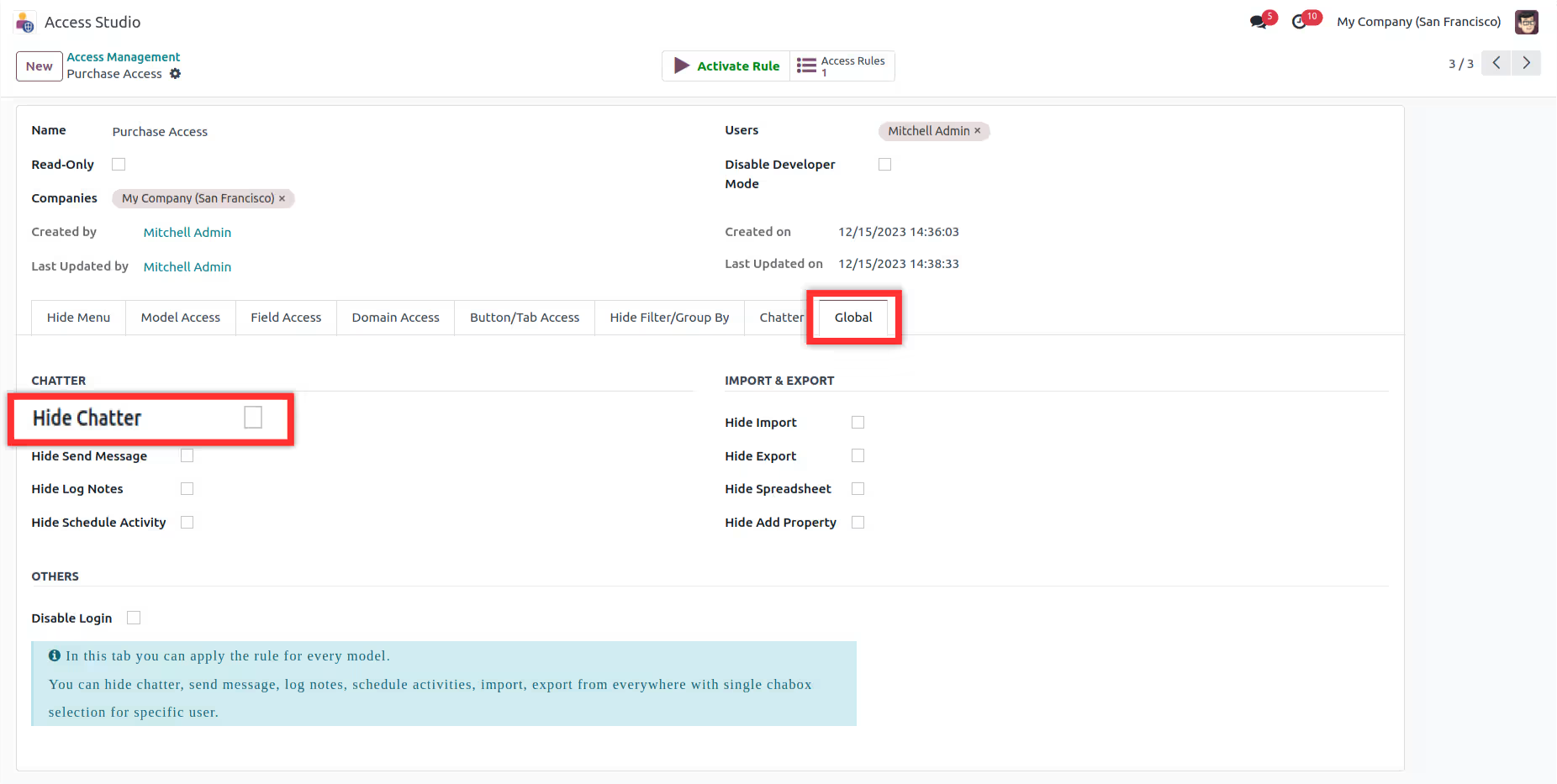
You can "Hide Chatter" button from every model by enabling relative checkboxes.
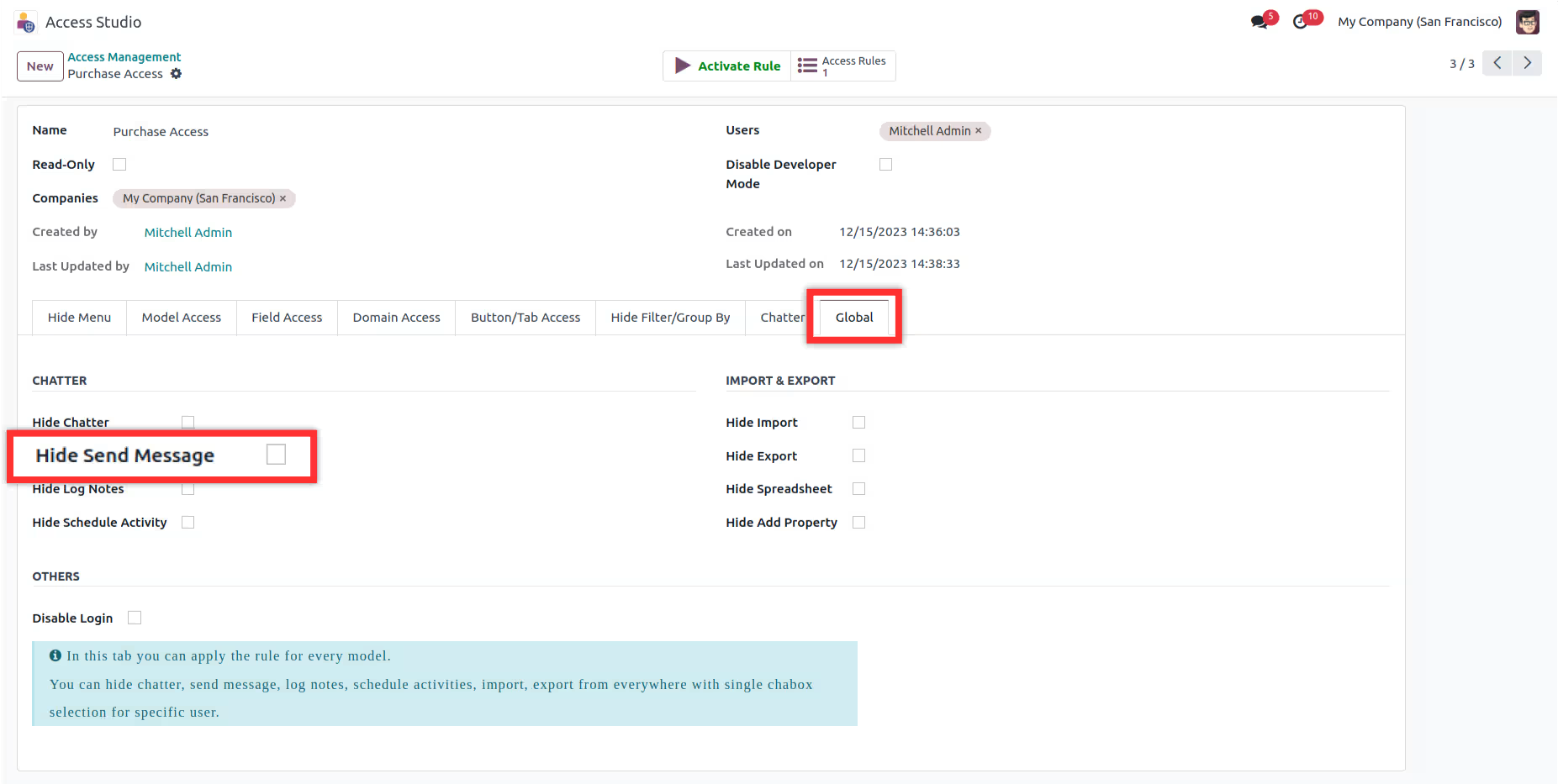
You can "Hide Send Message" button from every model by enabling relative checkboxes.
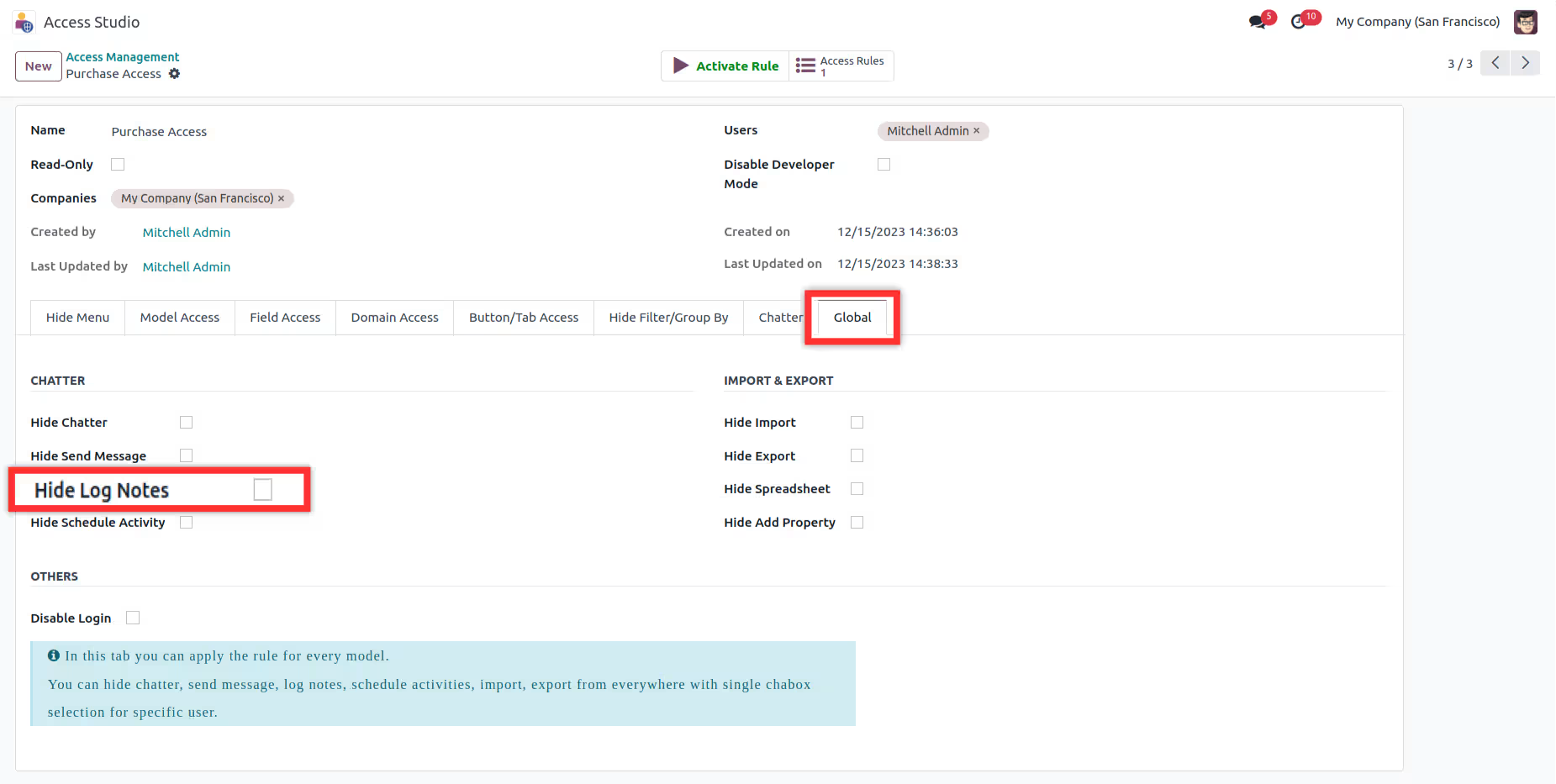
You can "Hide Log Notes" button from every model by enabling relative checkboxes.
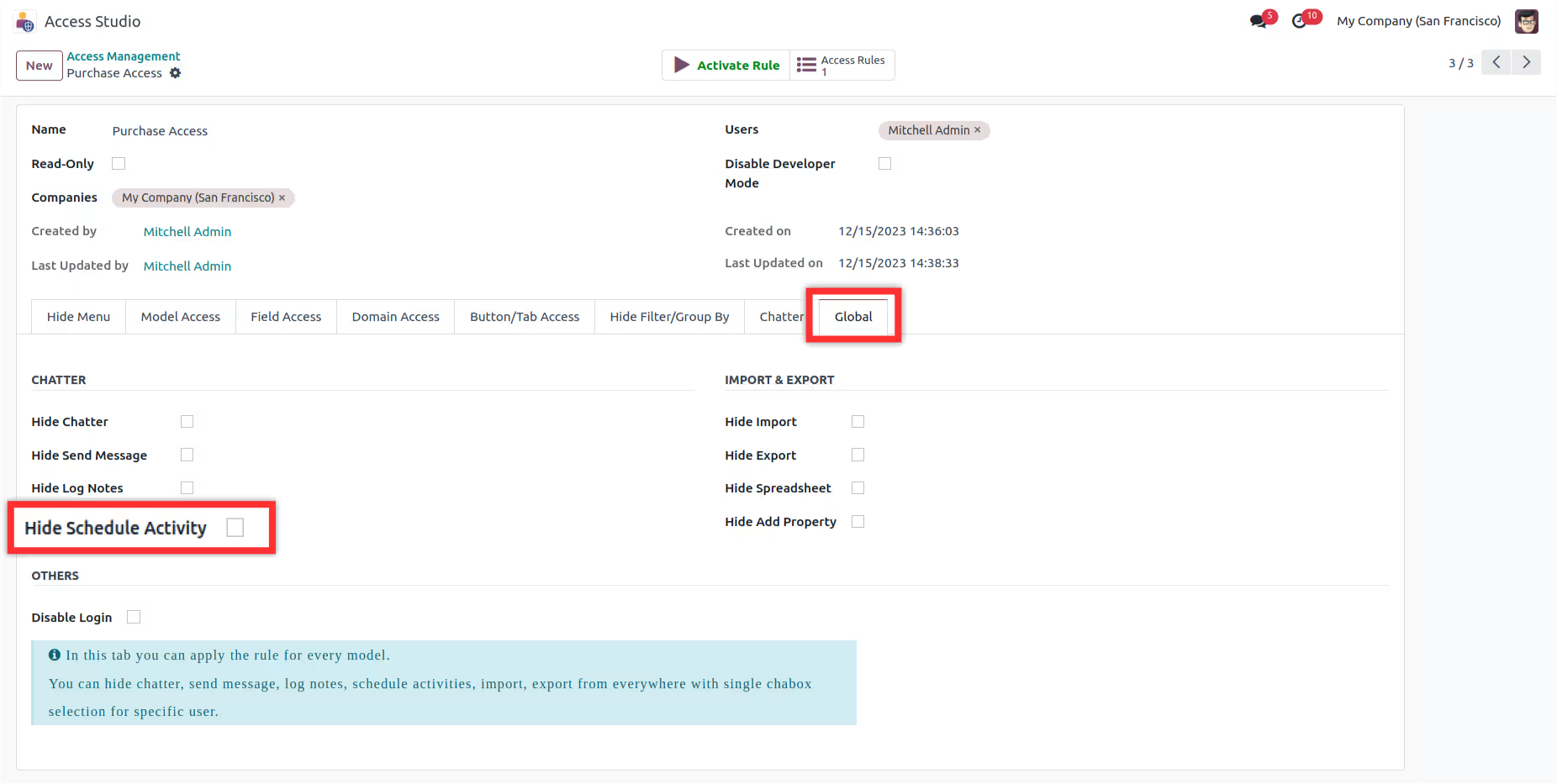
You can "Hide Schedule Activity" button from every model by enabling relative checkboxes.
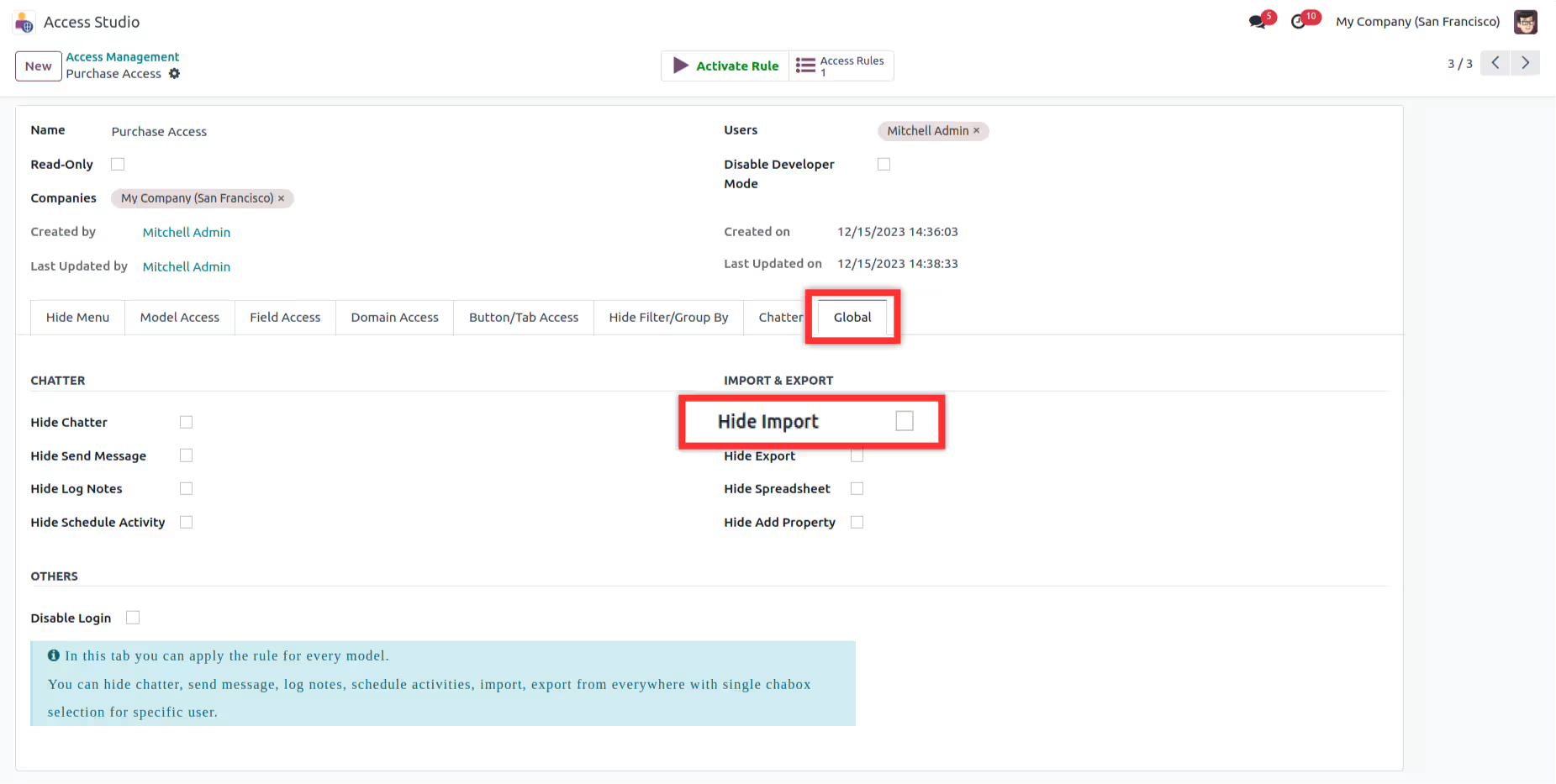
The "Import" buttons on each model will become invisible when you enable the associated checkboxes.
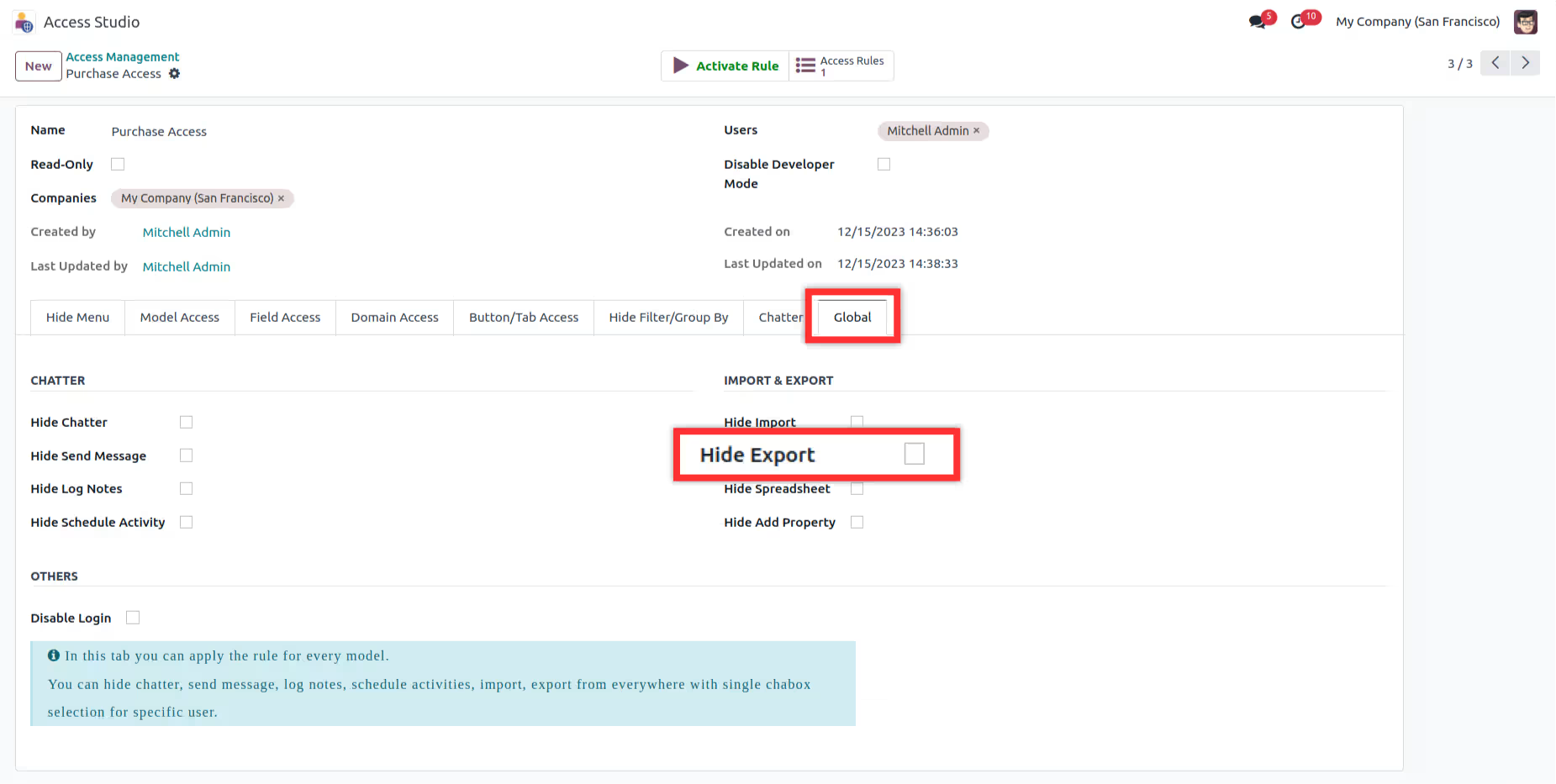
The "Export" buttons on each model will become invisible when you enable the associated checkboxes.
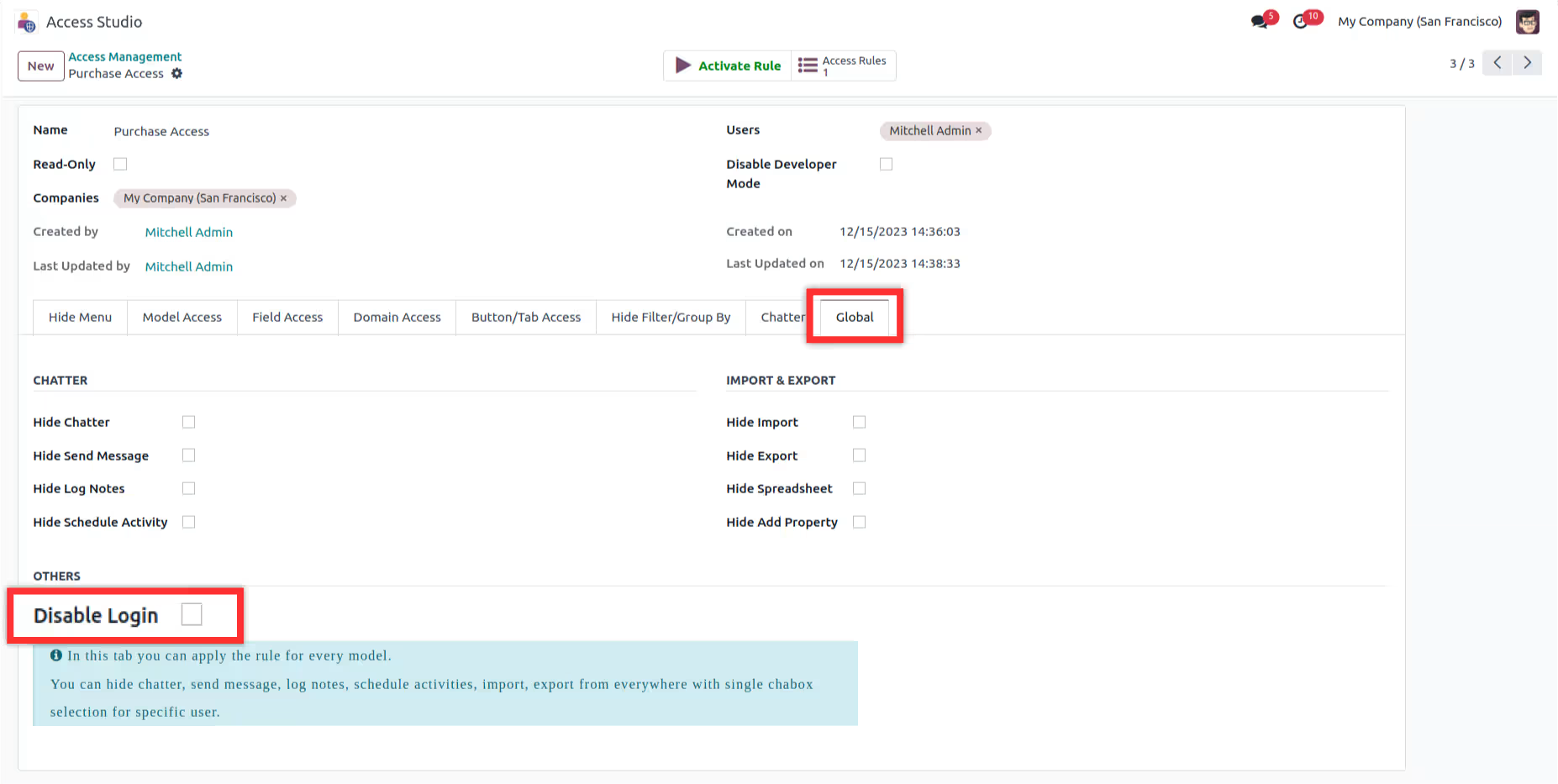
You can restrict specific users from accessing the database by the "Disable login" button.
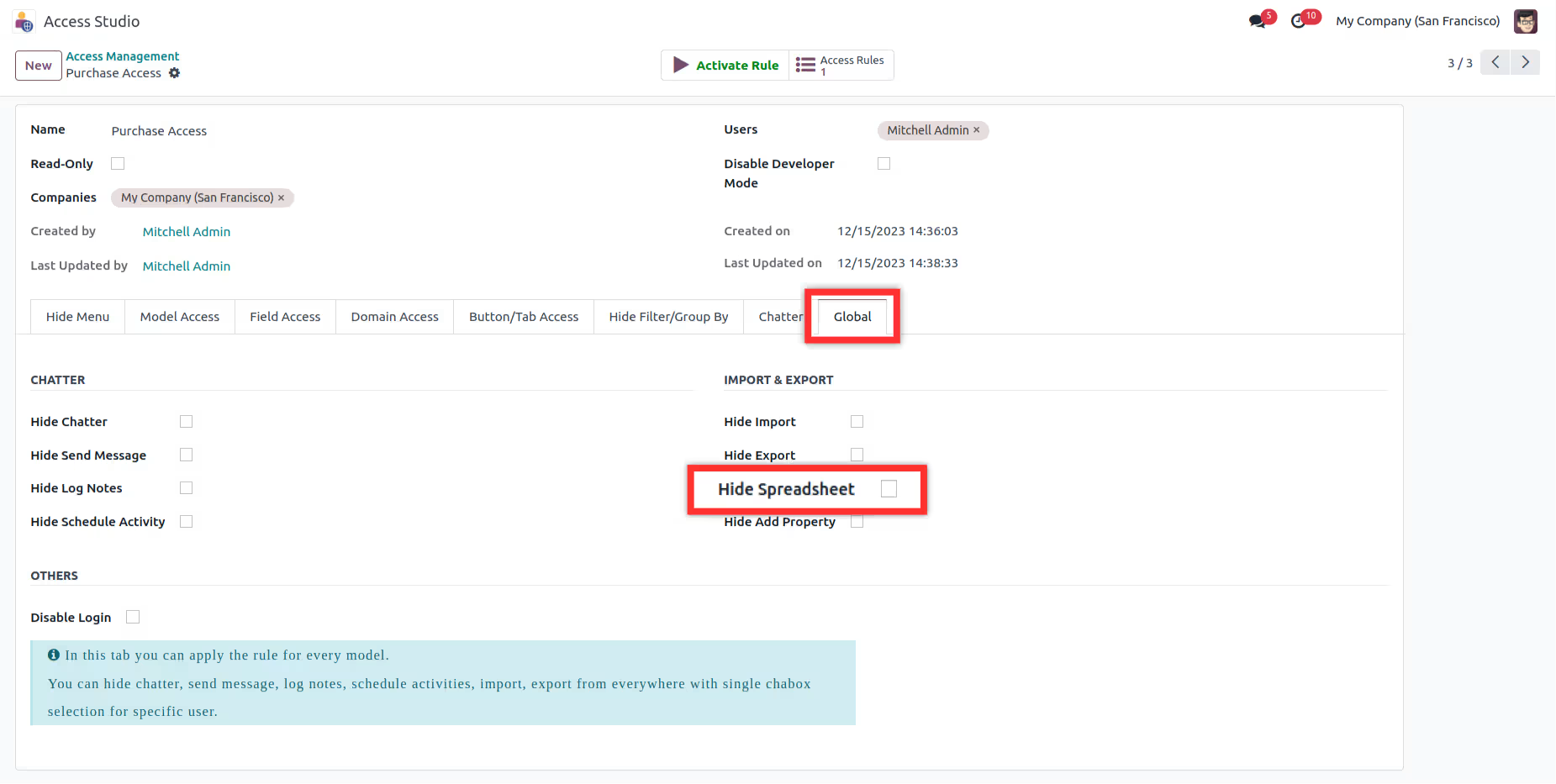
You can "Hide Spreadsheet" button from every model by enabling relative checkboxes.
Please note this feature is for Advance access management module.
Please note this feature is for Advance access management module.

After installing this module, You need to enable user group named 'Access management' for users,
who you want to allow to run this app.

First go to > Settings > Users > than check Access Management checkbox.
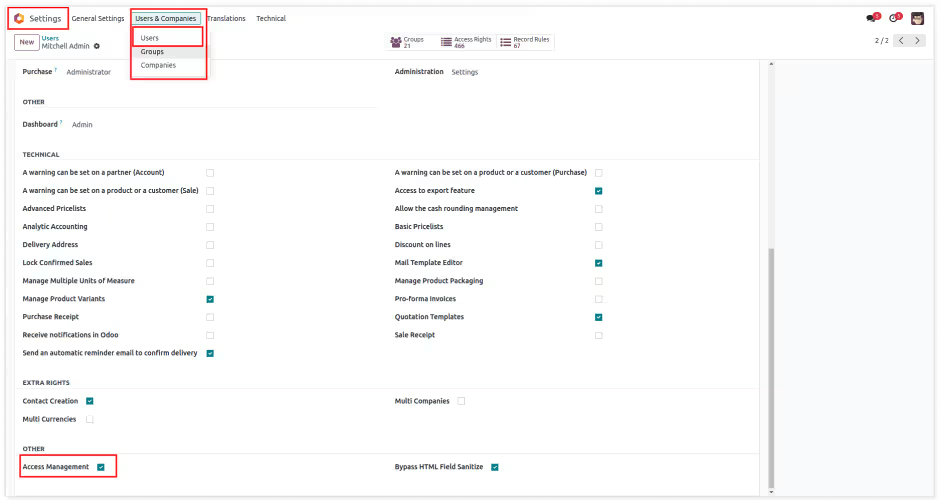
Now you have the access of access studio (access management app). You can see the app access
studio in your apps window.
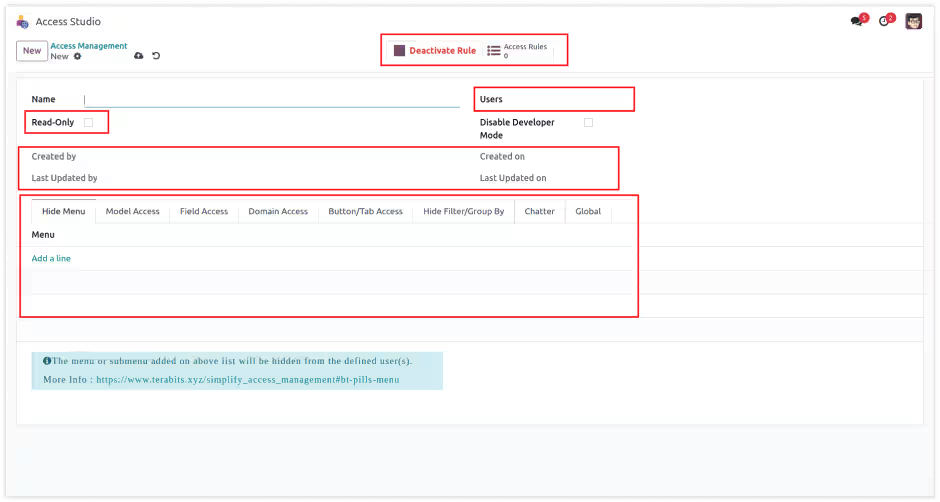

Users :
Select the users to which you want to apply the access rules.
Read-Only :
This checkbox is for setting ready-only access to any users. To make users ready-only in the environment you have to change access from settings. But here only one click will make any user read-only in the environment.
Hide Chatter :
This checkbox is for hiding chatter for any users. after checking this field, selected users will not be able to
watch the chatter window in every model's views.
Disable Developer Mode :
This checkbox is for disable developer mode for specified users.
Companies :
This rule is also applicable in multi companies, So here you
can set companies in which you have to apply this rule.
Created by, Created On, Last Updated by, Last Updated on :
This fields show the detail of create date of this rule, Created on which date?, Last updated
by and Last updated datetime.
Tabs (Menu Access, Model Access, Field Access, Domain Access, Button/Tab Access) :
All tabs are have their own features for access rights, You can define realted access rights in every tab/page.
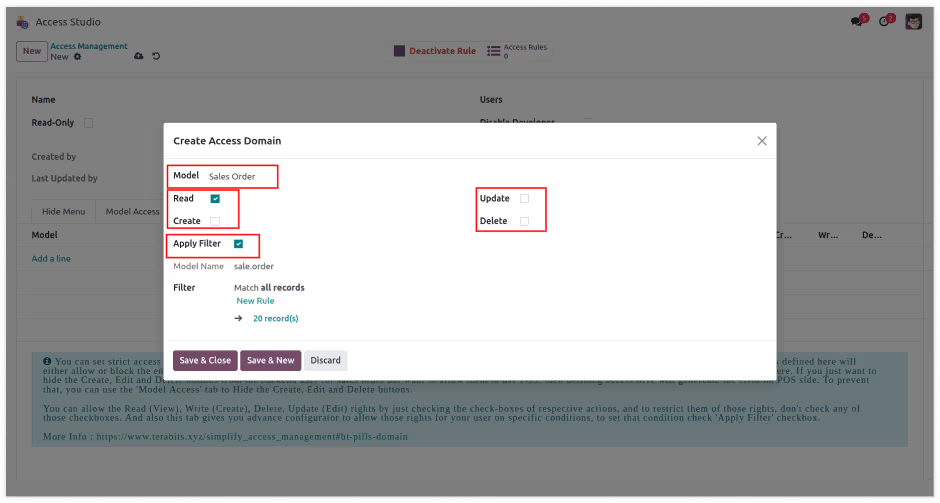
Create Access Domain Form :
In this form we have placed the fields for domain access rules like restrict CREATE, UPDATE, DELETE,
and make READ ONLY access for specified model. And apply filter is for customize our own domain.
Detailed explanation available in next USERGUIDE page.
Module Setup
- The main advantage of these features is that when the admin user wants to do changes to access rights of other child users. but for that, they should need the technical knowledge to do these changes. So, here it has been simplified. Any normal user who doesn't have any technical knowledge is just needed to understand this module's feature and then just need to make one rule and its configuration. No coding/XML changes will be required.
Menu/Submenu Access Right Setup
- You can customize menu access for any user.
- You can hide any Menu for any app/model.
- You can hide any Sub-Menu for any app/model.
- You just have to select menu for any app, then it will hide that menu/submenu for particular user.
Model/View Access Right Setup
- You can customize specified models access for any user.
- You can restrict models'/apps' all Actions, Report print, Archive action, etc.
- You can hide any views(TREE, FORM, KANBAN etc) of any model.
- You can hide CREATE, EDIT, DELETE buttons from any models view.
- You can hide ARCHIVE/UNARCHIVE buttons from any models.
- You can restrict Export & Import record from in any model.
- You just select a model and then check its features/view to restrict.
Field's Access Right Setup
- You can customize specified model/app's field access for any user.
- You can make the field read-only.
- You can make the field invisible.
- You can hide External links of any relational field where user can create or search records of related models.
- You just select the model and its field than check the access which you want to restrict.
Domain Access Right Setup
- Set read, write, update, delete access for selected users of model.
- Set domain filter to show only filtered records to the user.
- Set read, write, delete access using Environment User(EU means logged in user.) or other users.
- You can create model wise multiple lines access rights. it will affect all selected users.
- Set Model access using filters and use of Environment User(logged-in user).
Buttons/Tabs access right setup
- You can make invisible object buttons, actions, smart buttons, from model. Also, number of tabs can be hidden of form view.
- You can hide any smart button of any model by just on setting.
- You can hide any Links in kanban view of any models.
- You can hide number of tabs in form view from selected user.
Readonly User Setup
- You can make users readonly.
- Readonly users can not modify anything in the system.
- Readonly users cant create any data, modify any settings, install/uninstall any app or delete any records in the system.
- With just one checkbox any user will set to readonly.

Need Help ?
You can instantly find the answer you need here when
you're looking for a quick solution.

You are right. provides it's own access management feature. But it's complex and not straight forward. It requires lots of configuration (at different places) to hide any field or button for any user. Our app simplifies access rights management for various elements without requiring technical expertise that too from one place.
Yes, you can restrict or hide almost 99% of elements of conditionally with our app. You can provide domain to add better conditions for some users. I.e. if you want to hide some records for some users like one salesperson should be able to see his own leads or his own sales orders only. Or an Accountant user should be able to see transactions of this month only.
Sure, we have created a complete guide for all the features and tutorials for you. Additionally if you still require any help or suggestions with any feature or functionality.
Indeed, our app ensures data security and regulatory compliance. We do not collect any data from your system.
If you think you require additional features that are not present in the app, you can customize the module your own. We can also help you with that if you need.
Yes, after purchasing the app, you are eligible for lifetime updates. You just need to check this app page for change-log, and the updated module can be downloaded from the same link you downloaded the app first time. If you want us to send the change-log and update notifications to you
In case of if any bug/issue raised in the listed features of this app, we are committed to providing 90 days of support free of cost. You will need to provide us the issue details and screenshots and we will get it fixed.
Changelog(s)
Each update brings improvements to make the
app work better for you.

:: Important Note ::
Whenever you upgrade your database to a newer version, before upgrading your database, please uninstall the Simplify Access Management module. If you don't do this, errors may occur. After the upgrade is completed, you can reinstall the module.
To keep your rules, use the Simplify Import and Export module to export them from your old database and import them into the new one. Please note that you will need this module in both versions, as only supports imports between the same versions. Since this module is required in both versions, it is free and can be downloaded from the store. Also, due to differences in names, actions, or fields between different versions, some rules may not be imported. You can check the logs and create those rules manually if needed.