
This module streamlines multi-company access control in by allowing administrators to assign user groups per company and dynamically manage menu visibility based on the active company. It ensures precise permission management and enhances navigation efficiency, security, and usability within a multi-company environment.
Assign user groups on a per-company basis for precise access control.
Automatically update user groups when switching companies to maintain accurate permissions.
Dynamically hide or show menus depending on the user’s active company context.
Ensure users retain at least basic Internal User access across companies.
Prevent loss of administrative privileges for admin users during transitions.
Seamlessly integrates with multi-company framework and security settings.
Enhanced multi-company permission management with granular user group control.
Improved security by restricting access and menus to context-relevant items.
Reduced administrative overhead through automated permissions updates.
Greater user clarity and streamlined navigation tailored to company context.
Consistent access rights maintained through company switches, avoiding errors.
Are you managing a multi-company setup in and need company-specific user access and menu visibility?
This Multi-Company User Group & Menu Access Manager allows you to assign user groups per company and dynamically control menu visibility based on selected companies.
With this app, you can:
-Assign Different User Groups for Each Company
-Automatically Update User Groups on Company Change
-Show/Hide Menus Based on User Groups & Company Selection
-Prevent Admin Users from Losing Super Access
-Seamless Multi-Company Management Without Manual Effort
This app ensures that users only see the menus and have access to groups relevant to their assigned company, eliminating confusion and unauthorized access.
- Multi-Company Group Assignment:Assign different user groups to each company for individual user access.
- Automatic Group Switching:When a user switches companies, the assigned groups update dynamically.
- Menu Access Control:Menus appear or disappear based on the assigned groups of the selected company.
- Retains Internal User Access:Ensures users always belong to at least the "Internal User" group.
- No Access Overwrite for Admins:Prevents admin users from losing ERP Manager access.
- Automatic Restriction of Sensitive Menus:Automatically assigns sensitive menus to the "No One" group for controlled access.
- Seamless Integration:Works seamlessly within the security and multi-company framework.
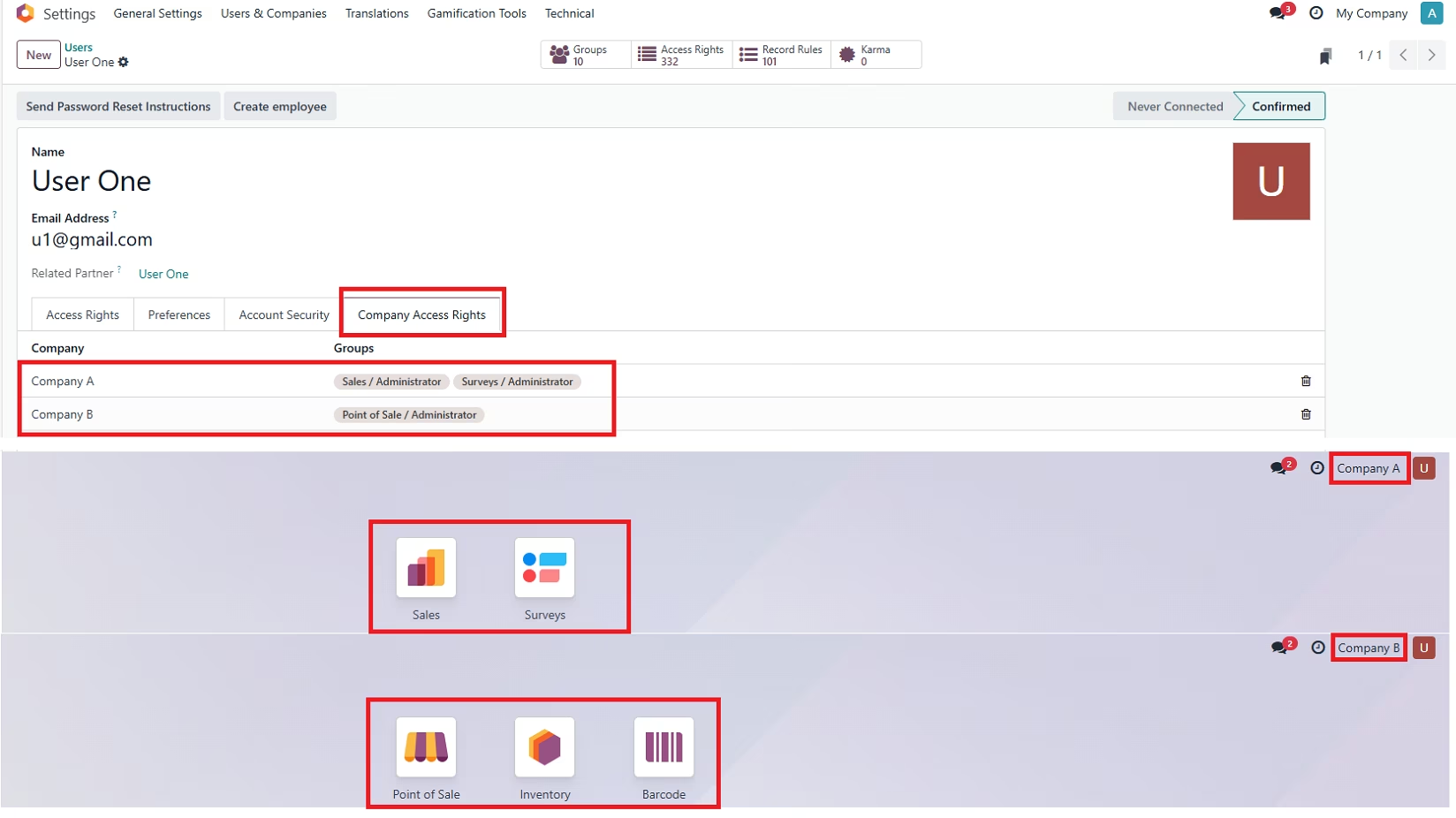
Configuration
- Install the Module from App Store.
- Navigate to Users & Companies > Users and select a user.
- Go to the new Company Groups and Menu Access Rights tab.
- Assign Companies and User Groups per company.
- Save the changes, and the system will dynamically update the userâs access when they switch companies.
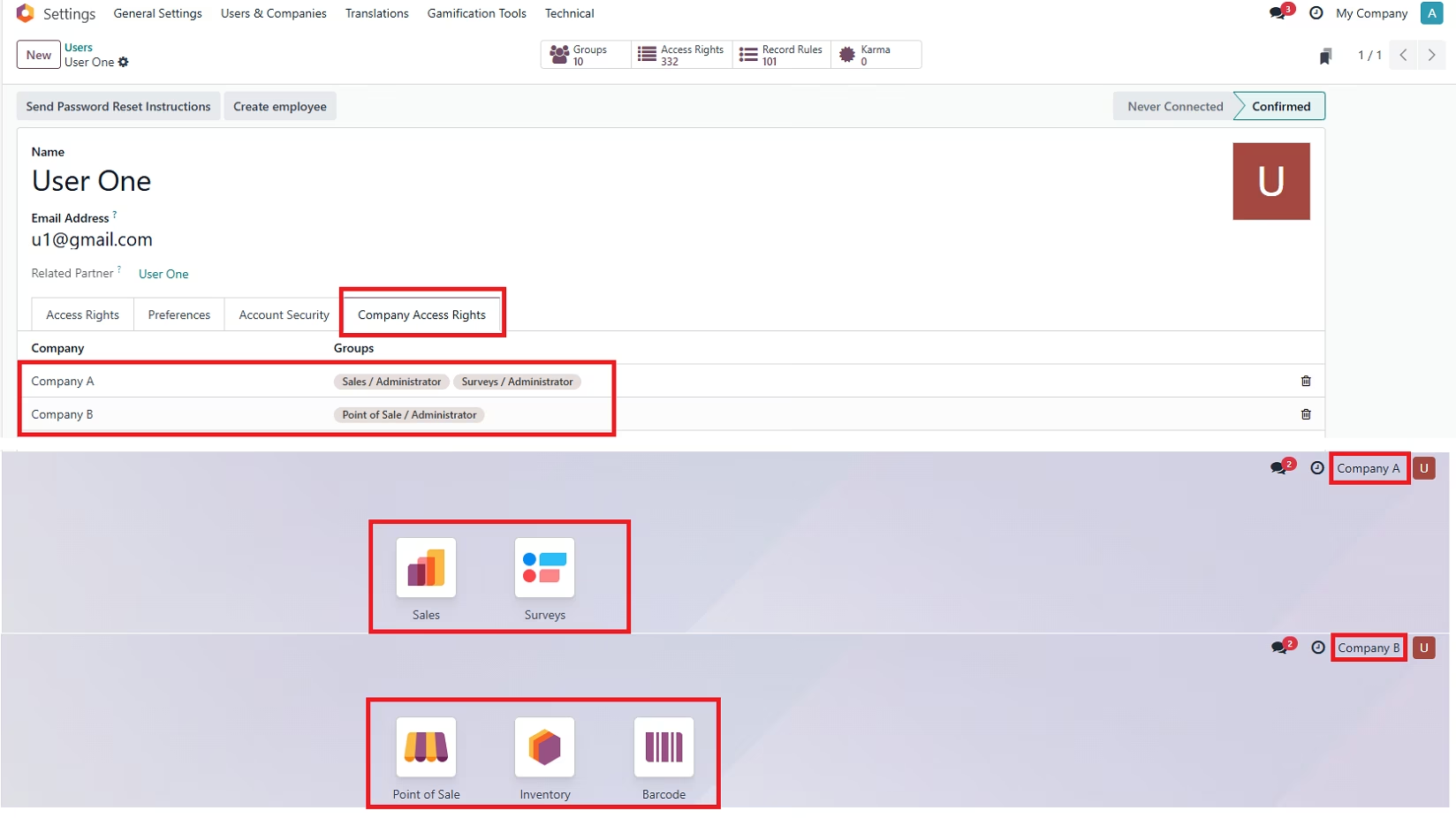
Why Choose This App?
- Optimized for Multi-Company Environments:Assigning groups company-wise is hassle-free.
- Improves Security & Access Management:Users only access whatâs relevant to their assigned company.
- Reduces Manual Work:No need to manually update user groups every time they switch companies.
- Get Started Now:Simplify multi-company user access and ensure secure and dynamic group & menu visibility.