
The module for provides a flexible way to apply discounts directly on individual invoice and bill lines. Whether using a percentage or fixed amount, businesses can manage pricing with more accuracy, transparency, and control. This feature ensures invoices reflect the exact discount strategy and improves overall financial reporting.
Apply percentage or fixed amount discounts on individual invoice or bill lines.
Flexible line-level discount management for accurate pricing.
Full integration with accounting and invoicing workflow.
Automatically adjusts totals to reflect applied discounts.
Gain precise control over invoice and bill line pricing.
Improve accuracy and clarity in financial documentation.
Streamline discount handling directly at line-item level.
Reduce errors and improve trust in customer billing.
Post line-level discount amounts to dedicated journal accounts — so your trial balance shows Gross Sales and Discount Given separately, instead of silently netted.
Standalone — no aos_base_account required.
Line-level fields —
undiscount, tax basis, more
Move types supported —
customer + vendor, invoice + refund
Setup steps —
create accounts, map, done
Companies & users —
flat license, no per-user fee
[AOS-DISC-DEMO]) · Apps cover synced with banner · Self-healing category wiring
Why net revenue alone isn’t enough
Standard flow computes subtotal as qty × price × (1 − discount%). The discount portion vanishes into net revenue. CFOs can’t measure discount-to-sales ratio. Auditors can’t tie posted PnL to the discounts that produced it.
Without this module
- Gross sales total — not visible. Sales Revenue posts net of discount only.
- Discount given total — requires SQL query against invoice lines every month-end.
- Discount-to-sales ratio — manual calculation; no PnL drill-down possible.
- Per-category tracking — impossible without custom report.
- Audit trail — discount lives in invoice line metadata, not in the GL.
With this module
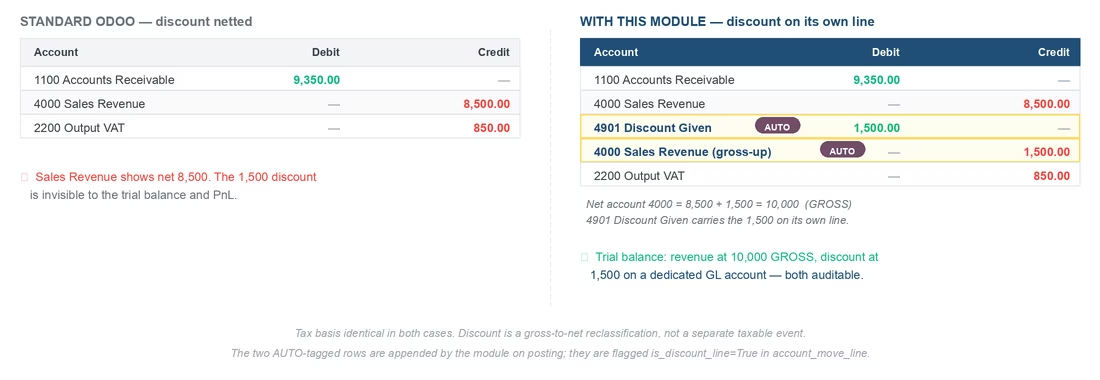
- Gross sales total — Sales Revenue at NET on the original line + a gross-up counter on the same account: trial-balance sum rolls up to GROSS. Tax basis unchanged.
- Discount given total — dedicated GL line per invoice line, flagged
is_discount_line=True. PnL drill-down works. - Discount-to-sales ratio — one click in Accounting → Reporting → Profit and Loss.
- Per-category tracking — configurable Discount Customer Account per
product.category. - Audit trail — DISC journal split cross-references each invoice line.
See the journal split in action
Same invoice line — qty 10, price 1,000, discount 15%, VAT 10% — posted with and without the module.
What you also get
Pre-discount columns
Five new optional columns in the invoice line editor: Undiscount, Disc Untaxed, Undiscount Tax Basis, Tax Basis. Hidden by default — toggle on per-user.
Refund + purchase symmetry
Works on customer invoices, customer refunds, vendor bills, and vendor refunds. Sign flips correctly; direction matrix documented in README.
Clean re-post flow
Edit discount %, reset to draft, re-post — DISC lines regenerate from the new value. No orphans, no manual cleanup. Idempotent.
Two-level configuration
Set defaults on product.category, override per product.template. Granular tracking where you need it, sensible defaults everywhere else.
Analytics-aware
Inherits analytic_account_id and analytic_tag_ids from the source line. Analytics breakdown remains intact across the DISC split.
Tax-safe
Tax basis computed on post-discount net, exactly like standard. The DISC split is GL-only — your VAT return, SPT, output VAT all unchanged.
How it compares
| Reporting need | Standard | With this module |
|---|---|---|
| Gross sales total in trial balance | net only | ✓ gross posted |
| Discount given as a GL line | ✗ invisible | ✓ dedicated account |
| PnL drill-down to discounts | ✗ | ✓ one click |
| Per-category tracking | ✗ | ✓ product.category field |
| Per-product override | ✗ | ✓ product.template field |
| Refund / vendor side | net only | ✓ sign-flip symmetric |
| Tax basis | post-discount | post-discount (unchanged) |
| Re-post after edit | n/a | ✓ idempotent |
Direction matrix — all four move types
Same code path handles sales and purchases, invoices and refunds. Sign flips automatically based on move_type.
| Move type | Debit | Credit |
|---|---|---|
out_invoice |
Discount Customer Account | original income account |
out_refund |
original income account | Discount Customer Account |
in_invoice |
original expense account | Discount Vendor Account |
in_refund |
Discount Vendor Account | original expense account |
Configure without code
Three setup steps, less than three minutes. No Python, no XML, no module restart.
Create discount accounts
Accounting → Chart of Accounts → create two new accounts: Discount Given (income-other) and Discount Received (expense-other). Codes follow your local CoA.
Map to categories
Inventory → Configuration → Product Categories → pick category → under Account Properties, set Discount Customer Account and Discount Vendor Account.
(Optional) per-product override
For products that need separate tracking (slow-mover vs promo discount, etc.), open product.template → Accounting tab → override the account. Falls back to category if blank.
Resolution order at posting time: product.template override → product.category default → skip (no DISC split generated for that line). Blank both = invoice posts normally, exactly like standard.
Fields added — ready for custom reports
Six new fields on account.move.line, all stored and computed. Use them in QWeb invoice templates or custom XLSX exporters.
| Field | Purpose |
|---|---|
price_undiscount |
Line total before discount % applied |
price_discount_untaxed |
The discount amount, untaxed — value of the DISC journal split |
price_undiscount_untaxed |
Tax basis as if no discount were applied |
price_untaxed |
Actual taxable base (= price_subtotal, materialised for reports) |
price_unit_undiscount_untaxed |
Per-unit price, pre-discount, post-tax-removal |
is_discount_line |
True on the auto-generated DISC split rows — use to filter them out of reports |
Installation — 3 minutes
- Purchase & download the module from the Apps Store.
- Extract into your addons path.
- Open Apps → Update Apps List.
- Search Journal Discount on Invoice Line → click Install.
- Create your Discount Given / Discount Received accounts in the Chart of Accounts.
- Assign them to your product categories (or per product).
Depends on account only (ships with Community). Zero custom modules required. No Python packages to install.
One license · All features · Free updates
One-time license
EUR 129
Single database · unlimited users · single fee
- ✓ All four move types (sales + purchase, invoice + refund)
- ✓ Per-category + per-product configuration
- ✓ Six new line-level fields (computed + stored)
- ✓ Analytics-aware, tax-safe
- ✓ Idempotent re-post / cancel handling
- ✓ Source code included (OPL-1)
- ✓ Free updates within 15.x
- ✓ Email support (1 business day)