
This advanced module provides sophisticated control over delete action menu button visibility across various models within the platform. It addresses critical business needs for enhanced data security and accident prevention by enabling administrators to dynamically manage delete button accessibility based on user roles and specific model requirements. The system empowers organizations to implement granular security policies that prevent unauthorized data deletion while maintaining flexibility for authorized operations. Key benefits include robust data protection, reduced risk of accidental data loss, improved compliance with data retention policies, and streamlined user experiences tailored to individual role requirements 1.
Role-based delete button visibility control with customizable user group permissions.
Model-specific configuration allowing different settings for each model.
Simple toggle interface for easy activation and deactivation of delete restrictions.
Comprehensive coverage across all standard and custom models.
Real-time button visibility updates without requiring page refresh.
Non-intrusive implementation that preserves existing functionality.
Detailed logging and audit trail capabilities for security monitoring.
Significantly reduces risk of accidental or unauthorized data deletion.
Enhances compliance with data protection regulations and internal policies.
Streamlines user interface by removing unnecessary options based on roles.
Improves data integrity and system reliability through controlled access.
Reduces administrative overhead associated with data recovery incidents.
Provides peace of mind for managing sensitive business information.
The Model-Based Delete Action Control app provides a highly customizable way to control the visibility of the delete action menu button across models, ensuring enhanced security and streamlined management of sensitive records. This app empowers administrators to determine which users can see and use the delete action based on their group membership and the specific models they are working with. By enabling model-wise configurations, you can easily decide where to apply delete restrictions, all while maintaining flexibility across your entire environment.
With a simple toggle control for each model, administrators can selectively hide or show the delete button based on business requirements. For example, if you want to prevent the accidental deletion of sale orders, you can activate the toggle for Sale Orders. This prevents users in the designated group from deleting any sale order records while allowing deletion in other areas of the system.
This app is perfect for organizations looking to boost security, prevent data loss, and retain control over critical business records, especially in high-compliance environments. Whether you need to protect sales data, accounting entries, or operational workflows, the Model-Based Delete Action Control app provides an easy-to-manage solution.
- Role/Group-Based Delete Control:Manage the visibility of the delete action menu button based on the userâs role or group, ensuring only authorized users have access to delete records.
- Model-Specific Configuration:Configure the delete action visibility for individual models. For example, hide the delete button for Sale Orders but keep it visible for other models.
- Toggle Control:Enable or disable the hiding of the delete button with an easy-to-use toggle for each model, allowing flexibility for specific use cases.
- Enhanced Security:Prevent accidental or unauthorized deletion of important records by selectively disabling the delete option.
- Seamless Integration:Works across all models, ensuring a consistent user experience throughout the system.
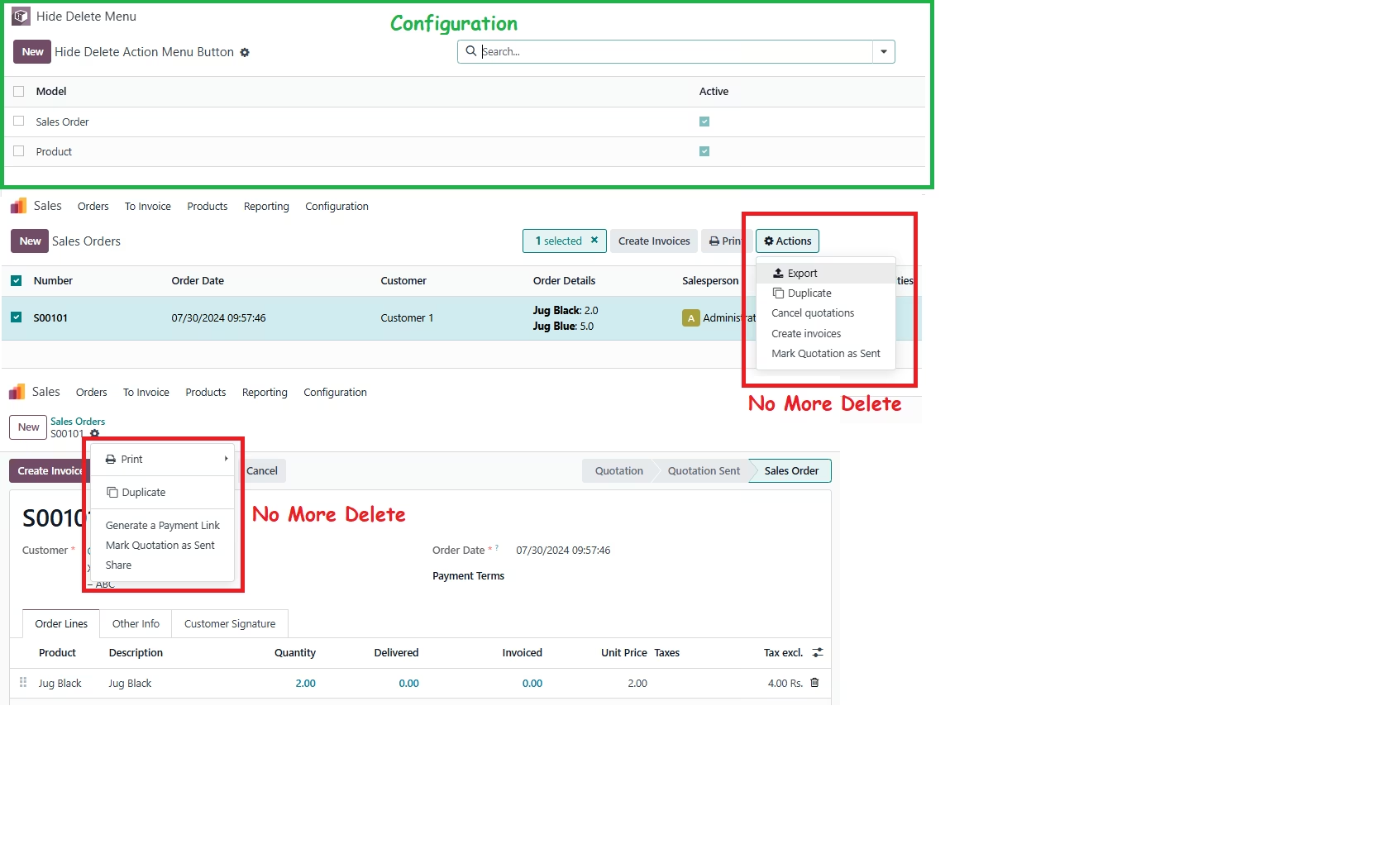
Configuration
- User Group Setup:Assign the appropriate users to the group that controls the delete action menu visibility.
- Navigate to Hide Delete Menu:Go to the menu and click on the Hide Delete Menu.
- Create New Configuration:Click on "Create" to add a new configuration record.
- Model-Specific Setup:For each model (e.g., Sale Order), create a configuration in the app with a toggle checkbox to activate or deactivate the hiding of the delete button.
- Flexibility and Control:Adjust the configuration as needed. The delete button will automatically hide or appear based on the user group and the model's specific toggle setting.