
This specialized module provides essential website branding control by enabling businesses to remove the "Powered by" footer text from their website pages. It addresses the common requirement for creating a fully white-label website presence, particularly important for agencies, resellers, and businesses wanting to maintain consistent brand identity across all customer touchpoints. The system offers a straightforward solution for enhancing professional appearance by eliminating default platform attribution while preserving all core website functionality. Key benefits include strengthened brand consistency, improved professional presentation, and greater customization flexibility for businesses leveraging e-commerce and website capabilities.
One-click removal of "Powered by" footer text from all website pages
Non-destructive implementation that preserves original footer functionality
Automatic application across all website templates and themes
No coding required for basic branding customization
Maintains full website functionality while removing attribution
Quick toggle functionality for easy reversal if needed
Compatible with both community and enterprise editions
Enhances professional brand presentation by removing third-party attribution
Creates a white-label website experience for client-facing businesses
Maintains brand consistency across all digital properties
Improves customer perception with clean, professional website footer
Increases customization flexibility for agency and reseller partners
Provides immediate visual upgrade without technical complexity
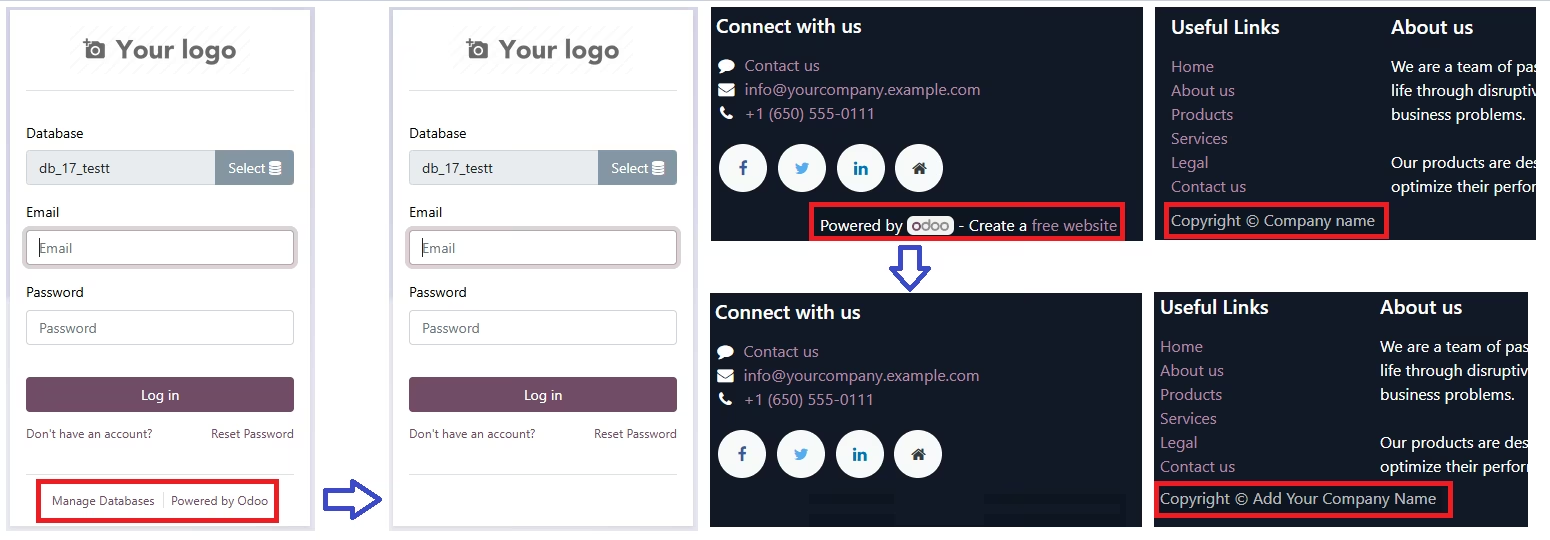
Enhance your experience with the Custom Branding and Copyrights module. This powerful tool allows you to remove default branding messages and personalize your instance to reflect your company's identity seamlessly.
- Remove Branding Messages:Eliminate the Create a Free Website - Powered by footer branding message, maintaining a clean and professional appearance across your applications.
- Customize Login Screen:Remove the Powered by message from the login screen, ensuring a cohesive branding experience for your users right from the start.
- Manage Database Link Removal:Simplify your interface by removing the Manage Database link, streamlining navigation and enhancing user focus.
- Add Custom Copyrights:Easily add and display your company's copyrights and legal notices in the footer or other designated areas within, asserting your ownership and compliance.
Why Choose Custom Branding and Copyrights?
- Enhanced Professionalism:Present a polished and cohesive brand image throughout your environment, enhancing user experience and trust.
- Customizable and Flexible:Tailor your instance to match your company's branding guidelines and legal requirements effortlessly.
- Easy Installation and Maintenance:Seamless integration with 17 ensures straightforward installation and compatibility with future updates.