
This module offers a streamlined solution to hide the “Generate Leads” button in the CRM interface. It is perfectly suited for administrators and developers looking to refine UI control and improve workflow clarity. By hiding this button, you can reduce clutter, manage lead generation more effectively, and enhance the overall user experience within the CRM all while providing precise interface customization.
Hide the “Generate Leads” button in CRM for cleaner interface
Customize lead generation visibility based on user roles and workflows
Provide precise UI control to streamline CRM navigation
Lightweight customization that integrates seamlessly with CRM interface
Enhance lead management processes with refined CRM interface control
Reduces interface clutter and simplifies CRM navigation for users
Helps enforce controlled lead generation processes effectively
Improves focus and efficiency by removing unnecessary buttons
Enables professional-level UI customization within CRM
Supports administrators in creating a tailored CRM experience
Efficiently manage your CRM interface by hiding the "Generate Leads" button based on user group permissions.
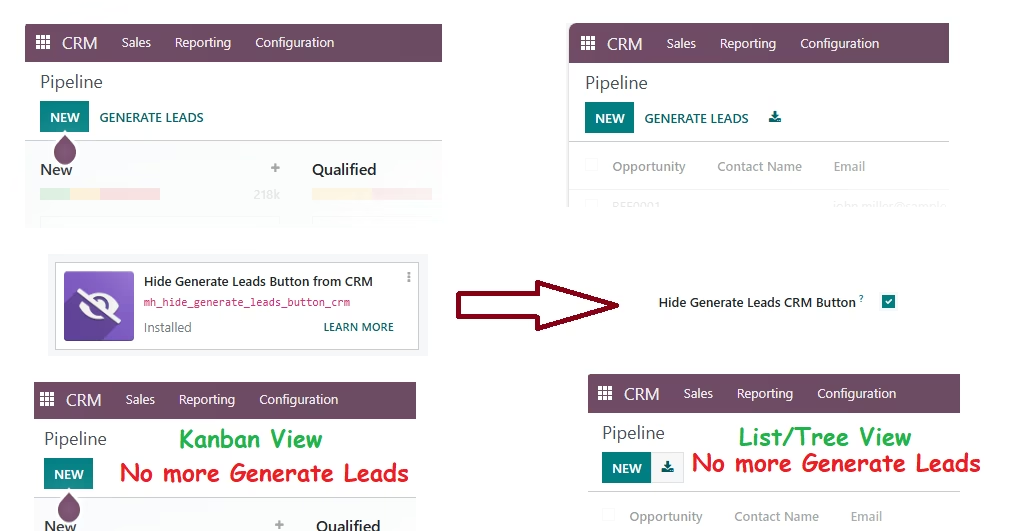
Our app provides a seamless way to control the visibility of the "Generate Leads" button within CRM Kanban and List views. Designed for businesses that need to restrict access to lead generation features, this module ensures that only users with specific roles or permissions can see and use the "Generate Leads" functionality.
- Role-Based Access Control: Hide the "Generate Leads" button based on the users group membership.
- Flexible Configuration: Easily configure the visibility settings through user groups.
- Seamless Integration: Integrates smoothly with existing CRM views without altering core functionalities.
- Enhanced Security: Ensure that only authorized personnel have access to lead generation tools.
- Seamless Integration: Works across all models, ensuring a consistent user experience throughout the system.
Configuration
- Install the Module: Navigate to the Apps menu, Search for Hide Generate Leads Button from CRM , Click "Install" to add the module to your instance.
- Configure User Group: Assign this Hide Generate Leads CRM Button group to the users for whom you want to hide the Generate Leads button.
- Flexibility and Control: Adjust the configuration as needed.