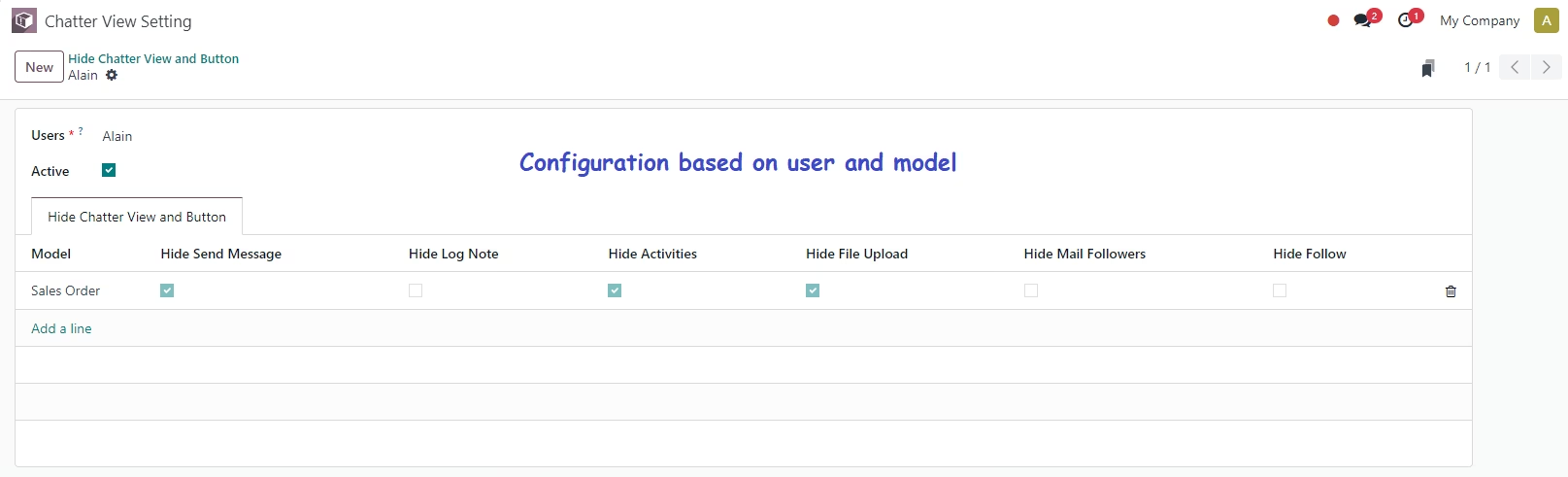
This module provides an elegant solution to dynamically hide frequently used chatter buttons like Send Message, Log Note, and Activities. It empowers administrators and developers to streamline the chatter interface, reduce distractions, and improve user focus. Seamlessly tailor messaging visibility and customize the chatter section's UI to match workflows and roles, enhancing communication control and user experience.
Keywords such as "hide chatter buttons," "chatter interface customization,"module" appear throughout to support SEO naturally.
Dynamically hide the “Send Message” button in the chatter interface
Remove the “Log Note” button to reduce chatter distractions
Hide the “Activities” button for a cleaner communication panel
Customizable visibility based on user roles or context
Integrates seamlessly with standard Discuss (mail) functionality
Enhances user focus by decluttering the chatter interface
Simplifies communication panels for more efficient workflows
Helps administrators tailor the user interface to project needs
Supports role-based UI customization in chatter interactions
Delivers professional-level UI refinement in environments
Enhance your mail chatter experience by dynamically controlling the visibility of key buttons based on user preferences.
With this app, administrators can configure visibility settings for the most commonly used buttons in the chatter interface, such as "Send Message", "Log Note", "Activities", and more. Tailor the interface to individual users or specific models, ensuring a streamlined, role-based user experience.
- Dynamic Visibility Configuration:Hide specific buttons in the mail chatter interface based on user configurations.
- Toggle Active/Inactive:Easily activate or deactivate the configuration for any user.
- Model-Specific Settings:Configure visibility on a per-model basis to control which users see which buttons for each model.
- Flexible User-based Settings:Use user IDs to specify which user will see the button configuration.
- Comprehensive Button Options:Configure visibility for the following buttons: Send Message, Log Note, Activities, File Upload, Mail Followers and Follow/Unfollow.
- Intuitive One2Many Configuration:Simple configuration interface for defining which buttons should be hidden for each model and user.
- Easy to Install and Use:No need for code changes, just configure through the interface.
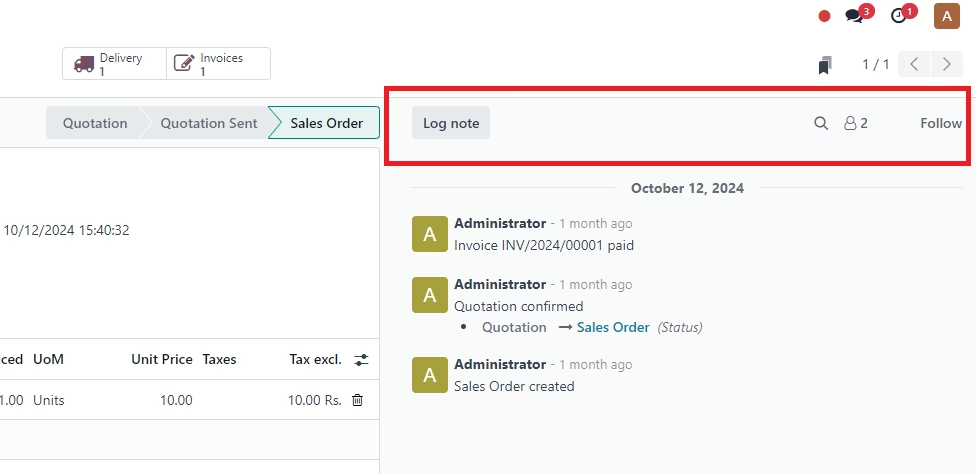
Configuration
Once installed, this app allows administrators to configure the visibility of the chatter buttons for specific users and models.
- User Configuration:Select the user for which you want to hide buttons.
-
Model-Specific Button Visibility:For each model, the app provides checkboxes to hide the following buttons.
- Hide Send Message Button
- Hide Log Note Button
- Hide Activities Button
- Hide File Upload Button
- Hide Mail Followers Button
- Hide Follow Button