The module for enables businesses to set default email templates for key models such as Sales Orders, Purchase Orders, and Invoices. By configuring default templates, companies can ensure that the appropriate email content is automatically selected when sending communications, reducing manual effort and maintaining consistency in messaging. This module is particularly beneficial for organizations with multiple companies or departments, as it allows for tailored email templates per company, streamlining communication processes and enhancing professionalism.
Default Email Template Assignment: Assign specific email templates to Sales Orders, Purchase Orders, and Invoices.
Company-Specific Templates: Set different default templates for each company within the instance.
Automatic Template Selection: Automatically select the appropriate email template when sending emails from the respective models.
User-Friendly Interface: Configure default templates through the Settings interface without the need for technical expertise.
Multi-Company Support: Manage default email templates across multiple companies seamlessly.
Template Customization: Customize email templates to align with company branding and communication standards.
Enhanced Communication Efficiency: Reduce manual selection of email templates, saving time and effort.
Consistency in Messaging: Ensure uniformity in email content across different departments and companies.
Integration with Modules: Works seamlessly with Sales, Purchase, and Invoicing modules.
Support for Custom Templates: Utilize custom email templates tailored to specific business needs.
Improved Efficiency: Automate the selection of appropriate email templates, streamlining communication processes.
Enhanced Professionalism: Maintain consistent and professional messaging across all communications.
Time Savings: Reduce the time spent manually selecting email templates for each communication.
Customization Flexibility: Tailor email templates to reflect company branding and specific requirements.
Scalability: Easily manage email templates as your organization grows and adds more companies.
User-Friendly Configuration: Set up default email templates without the need for technical expertise.
Consistency Across Departments: Ensure uniformity in email communications across different departments and teams.
Enhanced Customer Experience: Provide customers with consistent and professional communications, improving their experience.
Reduced Errors: Minimize the risk of sending incorrect or outdated email templates.
Compliance Assurance: Ensure that all communications adhere to company policies and standards.
In company wise default email template feature is not there, this app helps user to set default email template for quotation, sale order, request for quotation, purchase order, customer invoice. user can also set default email template for particular company ERP module which set as default template for send by email option, so each company can have different email contant and format.
Set Default Email Template for Quotation and Sale Order
User can set default email template for quotations and sale orders.

Set Default Email Template for Purchase and Invoice
User can set default eemail template for RFQ, purchase order, customer invoice.

Company Wise Default Email Template
User can set different default email template for particular company.
Generic Email Templates Configuration
Under Settings > General Settings > set default email templates, user can set default email template for quotation, sale order, request for quotation, purchase order and invoice for particular company.
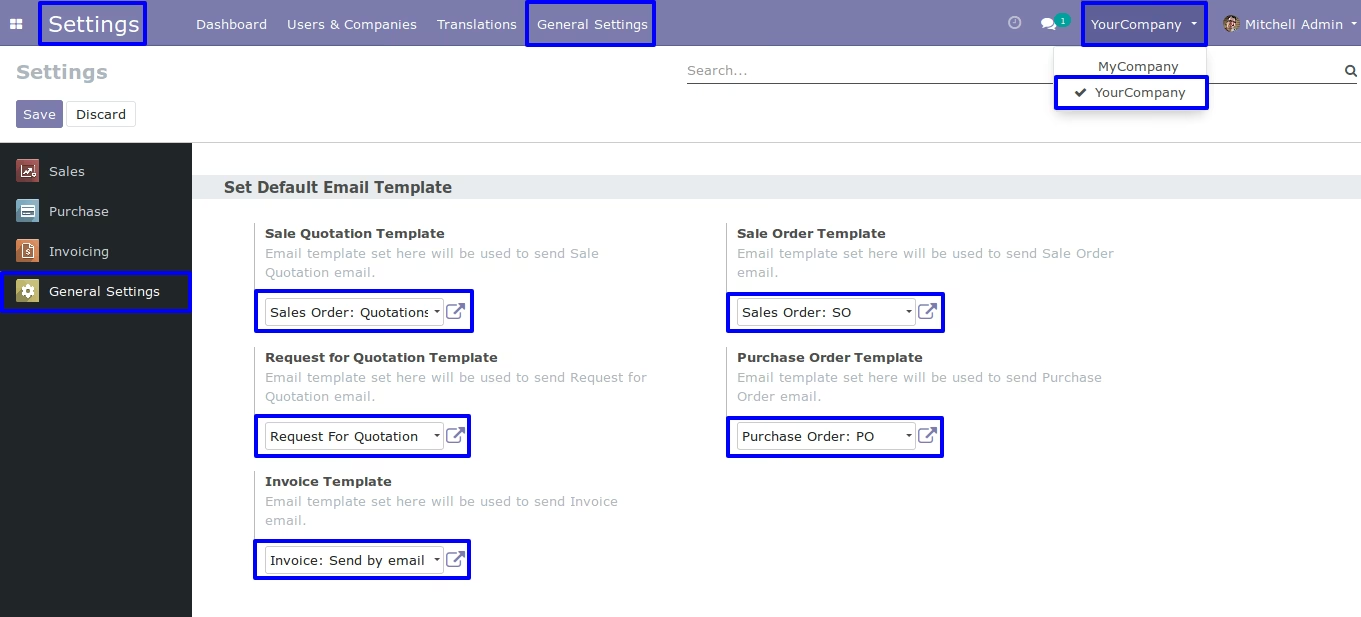
Default Sales Quotation Template
Default Sales Order Template
Default Request for Quotation Template
Default Purchase Order Template
Default Invoice Template