The module empowers users to broadcast messages via WhatsApp efficiently. Allowing mass messaging across multiple models such as contacts, leads, or invoices it streamlines communication for marketing, alerts, or transactional notifications. This centralized broadcast capability elevates customer engagement while saving time.
Supports mass sending of WhatsApp messages from within any model.
Uses predefined templates or allows custom text for personalized communications.
Integrated with mail-compose interface to choose WhatsApp instead of email.
Automatically creates fallback activities in the event of delivery failures.
Configurable per-model setup including phone-field mapping and error handling.
Enables webhook support and template management via a dedicated configuration menu.
Allows bulk messaging using mail templates linked to WhatsApp templates.
Boosts communication reach by sending bulk messages efficiently.
Enhances consistency through templated messaging.
Increases messaging speed and reduces repetitive manual steps.
Supports accountability with fallback activity tracking.
Offers flexibility across multiple business models and use cases.
Enhances message delivery reliability with webhook setup and error handling.
Improves engagement via real-time, broadcast-style messaging.
This is Base module + Marketing & Batch/Group with Templates
If you have already purchased Base module, no need to buy again (USD $99 free) when you buy this.
- Batch/Group: Create Batch/Group directly from records in list views.
- Marketing: Statistics and message scheduling.
- Templates: Many templates available to send.
- Button messages: Send buttons and analyze response. New!!

Instant access. Scan QR and done!
and you keep Whatsapp on your cell phone.

Like META, you must delete Whatsapp on your cell phone.
and is closed for new customers ?!
Gupshup works equal and has a lower price.
Compatible modules
Extend Chatroom main view
USD $59
Create CRM Leads
direct in ChatRoom
USD $59
Create Sale Order + Invoice
direct in ChatRoom
USD $49
See chat history
in chatter
USD $59
Create HelpDesk Ticket
direct in ChatRoom
USD $149
Automatic replies
Products & Templates
USD $179
Batch, Marketing & Group
messaging
Activate Batch/Group messaging
No extra modules required.
Enable only the ones you need!
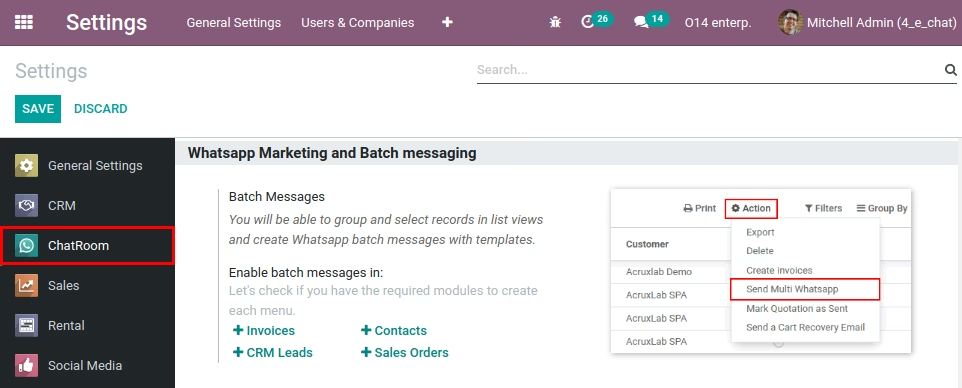
Go to Setting > ChatRoom
Click on the options you want to enable.
You can group messages from:
- Invoices.
- CRM Leads.
- Sales Orders.
- Contacts.
FREE message Templates for many apps
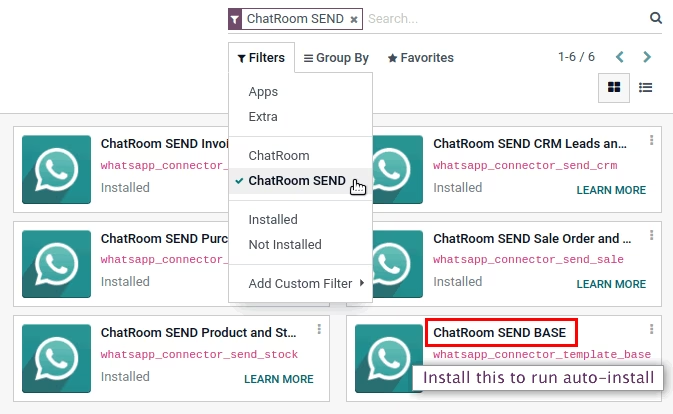
"ChatRoom PACK" module.
Many templates available to send
Dynamic templates for text and attachments.
You can modify and create your own templates.
Some available examples:
- Sale & Invoice PDF report.
- Sale & Invoice Payment link.
- Sale Portal link.
- Customer debt calculated on the fly.
Separate modules !!
Not forced to install unnecessary Apps.
Batch/Group messaging
Filter > Group > Select records in list views
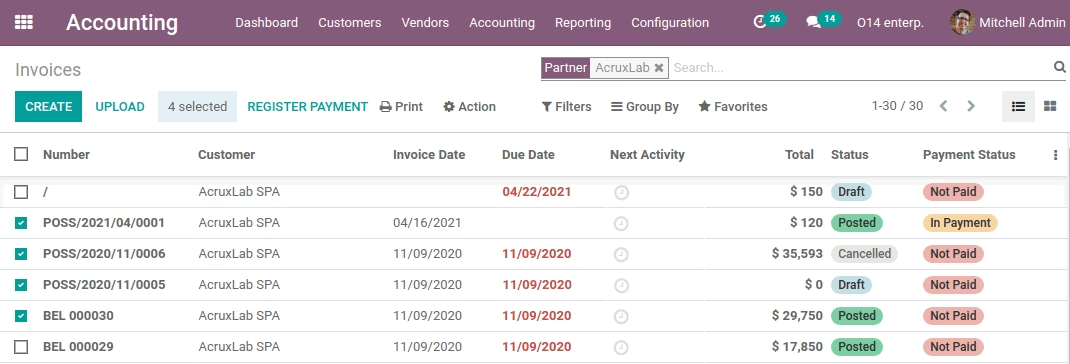
1) Open list views.
2) Apply your filters.
3) Select all or some records.
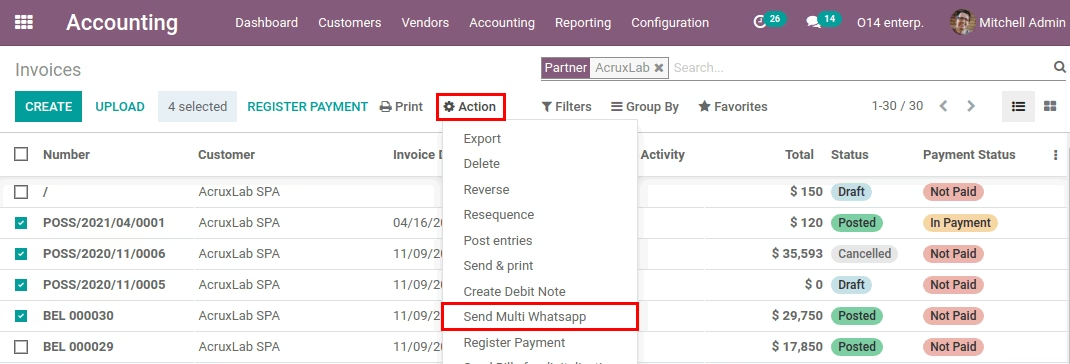
4) Click on Action menu.
5) Select Send Multi Whatsapp.
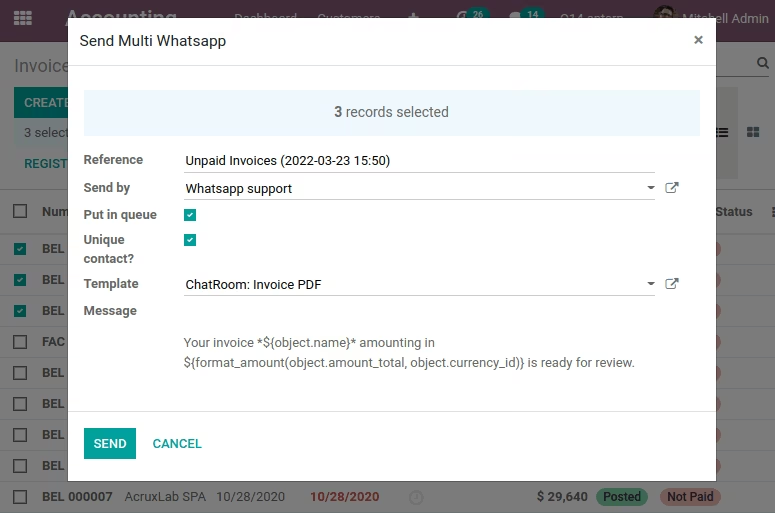
Reference:
Short description.
Send by:
Select from which Whatsapp number the messages will be sent (Module supports multi Whatsapp).
Put in queue:
Queue sending immediately or create in draft for advanced editing.
Unique contact:
Verify to send only one message per number (Do not repeat).
Template:
Select template for dynamic messages (Text and attachments).
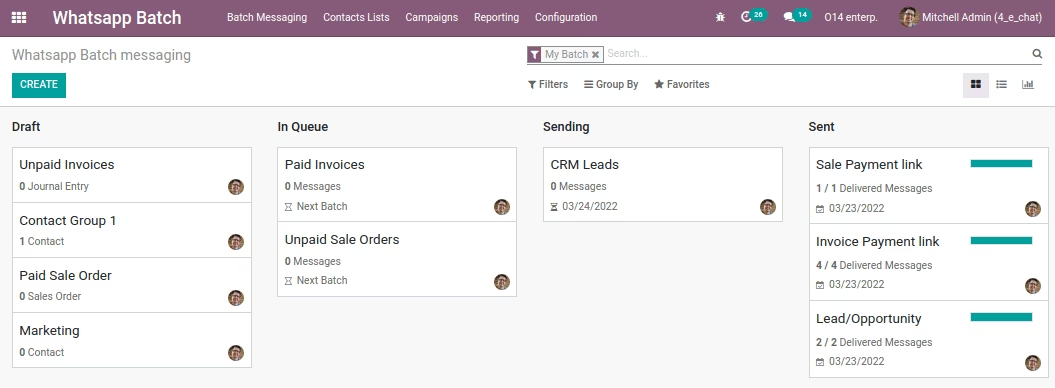
Go to Whatsapp Batch main menu.
Click on each Batch for statistics and details of each message.
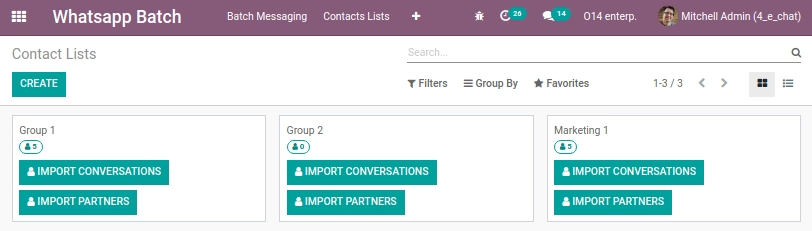
Go to Whatsapp Batch main menu.
In top menu, select Contacts List.
View each group in detail and import from contacts or chats.
Marketing campaigns
Whatsapp Marketing & Batch/Group messaging
Go to Whatsapp Batch main menu.
See your campaigns overview.
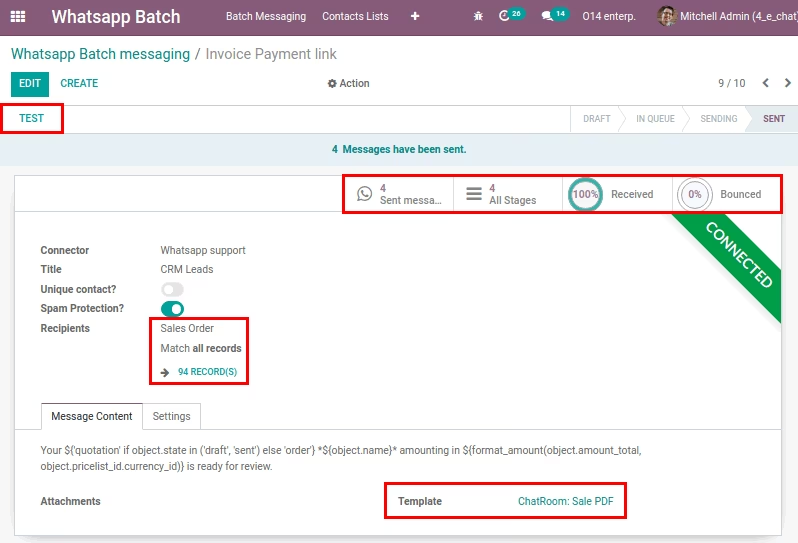
Test:
Click the Test button to enter a number and send a test message.
Statistics:
In the Statistics area you will be able to view summary information. Click on the buttons to view details.
Recipients:
Select where the contacts will be taken from and apply advanced filters.
Template:
Select the template to be used to build the messages.
Start sending options:
- Put in Queue: Messages will be sent as soon as possible.
- Schedule: Choose the date and time to start sending.
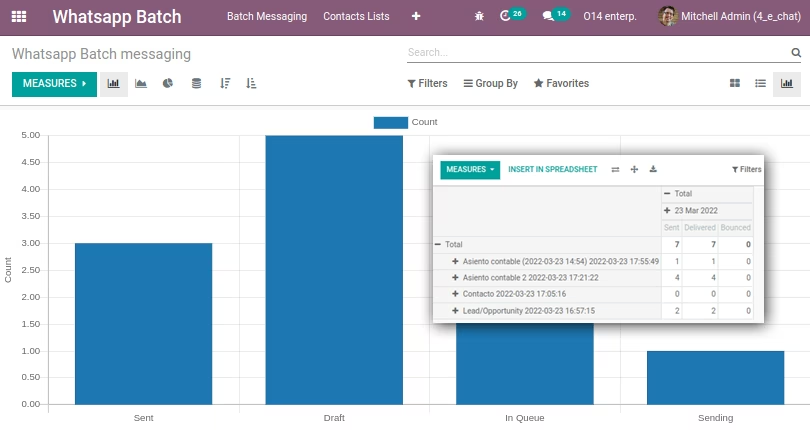
In top menu, select Reports.
Select the report style and apply your own filters.