
The module empowers users with the ability to manually set the effective date on key documents and transactions that are normally locked to the current date upon validation. Whether updating delivery dates, invoices, or orders, this feature ensures accurate historical data entry and improves reporting fidelity.
Allows manual selection of effective dates for validated documents such as invoices, purchase orders, sales orders, and stock moves.
Adds a user-friendly date picker interface directly within document forms.
Applies changes consistently across related records (journal entries, inventory movements, etc.).
Supports multiple modules natively: Accounting, Inventory, Sales, Purchase, and more.
Eliminates limitations of non-editable system date fields.
Simplifies data corrections and historic data import processes.
Seamlessly integrates with existing workflows.
Ensures consistency by updating all relevant records to reflect the new date.
Enhances auditability by showing traceable changes to effective dates.
Reduces manual efforts like canceling and recreating documents purely for dating corrections.
Enables accurate historical bookkeeping by aligning documents with actual transaction dates.
Enhances data consistency and reporting accuracy across modules.
Saves time by avoiding the need to recreate or reverse validated documents.
Supports smoother financial and inventory reconciliations for prior periods.
Helps maintain compliance by correcting misdated entries efficiently.
Improves system accuracy for audit trails and period closing.
Promotes flexibility in data entry and corrections.
Enhances the usability of existing documents without disruptive workflows.
Supports better decision-making with correct date context.
Streamlines operations during migrations, historical data imports, or corrections.
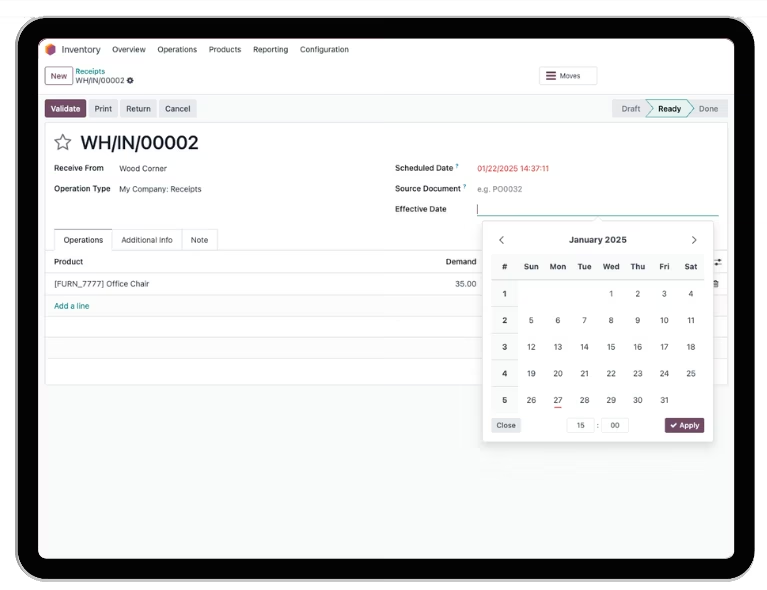
This module will allows you to change the effective date upon receiving or sending (or also called picking process).
You can also change the effective date of picking process that is alread in "Done" state.
Update Sales Order & Purchase Order
Change effective date on sales order & purchase order.
Update Stock Moves
The stock moves will automatically adjust their date to match the effective date you select.
Support Foreign Currency
It will dynamically adjust the currency rate according to the exchange rate of the selected historical date.
The Stock Valuation Will Also Follow
If you set automated stock valuation, it will also follow the new date you choose.
Best Suits For Your Late Document Input
If you need to work on a past document or record today, this module will seamlessly adjust the picking-related data to reflect the past date.
Update Sales Order & Purchase Order
Change effective date on sales order & purchase order.
Update Sales Order & Purchase Order
Change effective date on sales order & purchase order.