Secure your integrations with the highest standard of API authorization using the API OAuth2 Authentication module. This essential tool implements the OAuth2 framework, providing a secure and reliable method for third-party applications to access your data. By using access tokens, this module allows you to grant delegated authority to external applications without ever exposing user credentials, ensuring that your data remains protected. It is a must-have for any business looking to build robust, secure, and scalable API integrations.
OAuth2 Compliance: Implements the standard OAuth2 authorization-code-grant flow for secure and standardized API access.
Secure Token Management: Manages the complete lifecycle of access tokens, including issuance, refresh, and revocation.
Enhanced Security: Protects user credentials and sensitive data by using access tokens for API authentication.
Simplified Client Authorization: A streamlined process for client applications to obtain authorization and access tokens.
Seamless Integration: Fully integrated with the framework for a consistent and reliable user experience.
Developer-Friendly: Includes clear examples and documentation to simplify the development and deployment of secure API endpoints.
Industry-Standard Security: Secure your API with the most widely adopted authorization framework, trusted by major platforms worldwide.
Protect Sensitive Data: Prevent the exposure of user credentials and ensure that your business data is always protected.
Streamlined Integrations: Simplify the process of building secure and reliable integrations with third-party applications.
Automated Token Management: Reduce administrative overhead with automated management of the entire token lifecycle.
Scalable and Reliable: A robust and scalable solution that can grow with your business and its integration needs.
Increased Trust and Confidence: Build trust with your partners and users by implementing a secure and standardized authentication system.

OAuth 2.0 Authentication for APIs

Introduction
OAuth2 stands for "Open Authorization 2.0". It is the second version of the OAuth protocol, which is an open standard for access delegation commonly used for API authentication and authorization. OAuth 2.0 is a widely used authorization framework that allows applications to securely access resources on behalf of users without needing their credentials. It's commonly used for API authentication in web and mobile applications. OAuth 2.0 uses Access Tokens, an Access Token is a piece of data that represents the authorization to access resources on behalf of the end-user.
How It Works:
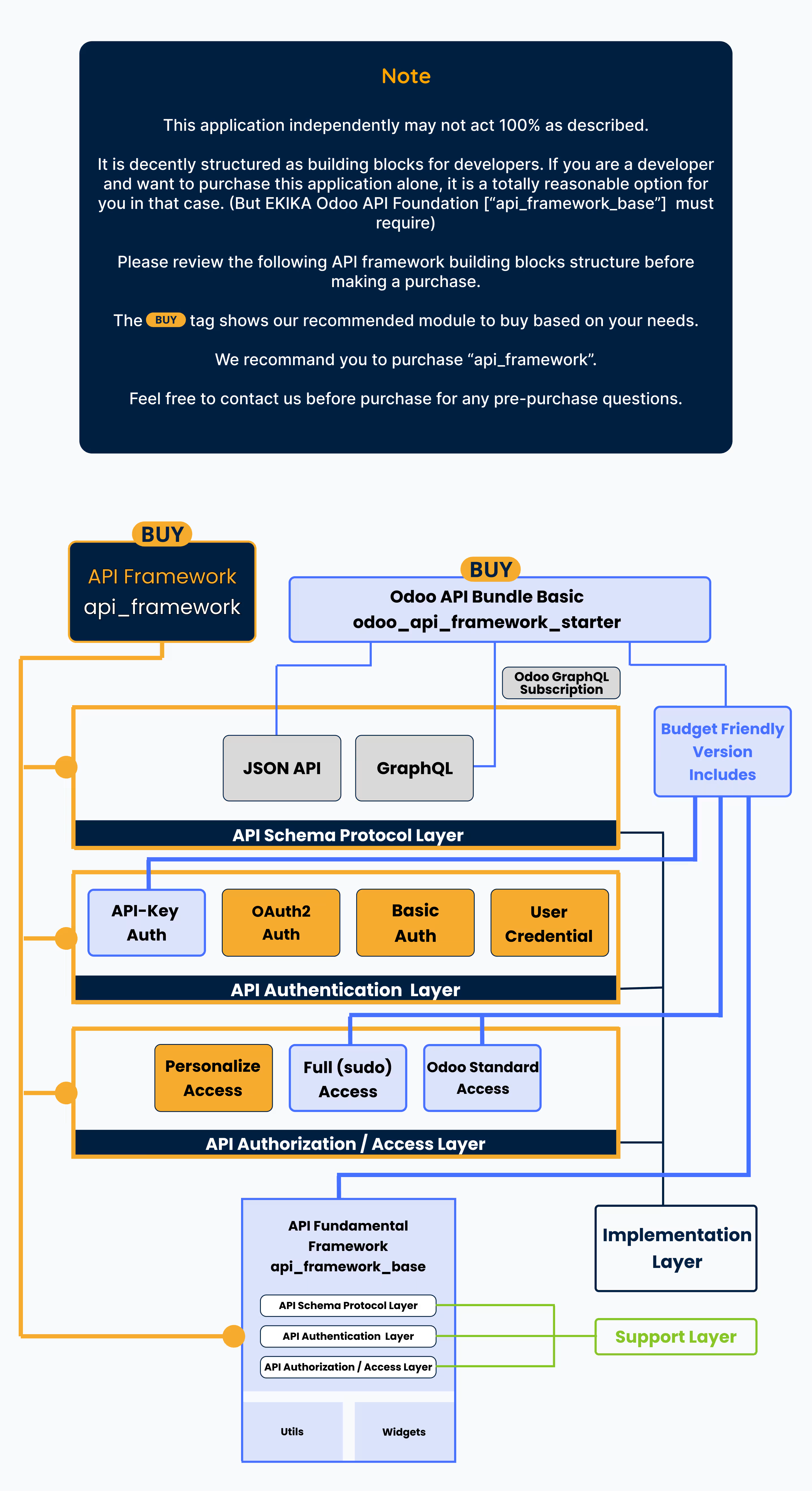
The API OAuth2 Authentication module for Odoo integrates the OAuth2 authorization coupled with api framework, ensuring secure API access with the authorization-code-grant flow of the specification. It provides seamless management of client authentication and token lifecycle, making it an essential component of the API bundle. This module enhances the security and functionality of your Odoo API integrations.
Benefits
- Enhanced security with OAuth2 standards.
- Simplified client authorization.
- Comprehensive token management.
- Seamless integration with Odoo.
- Developer-friendly with clear examples.
- Reliable access control.
- Scalable for businesses of all sizes.
Usage
- Secure API integration with third-party applications.
- Protect sensitive data accessed via APIs.
- Streamline OAuth2 authentication processes.
- Automate token lifecycle management, including issuance, refresh, and revocation.
- Simplify the development and deployment of secure API endpoints.
Authorization and Token Related Steps:
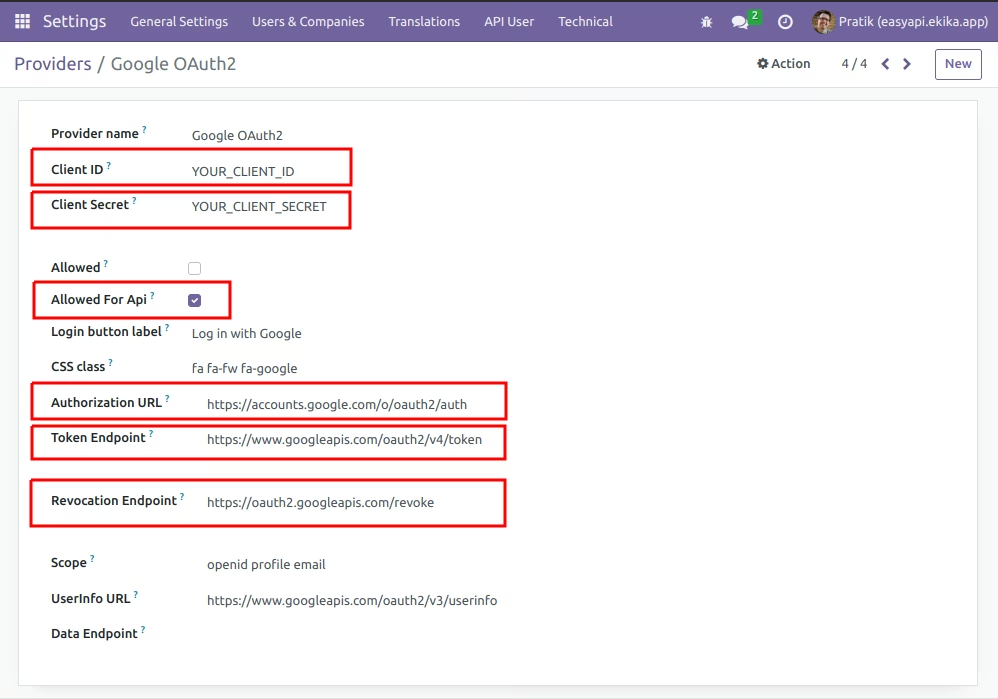
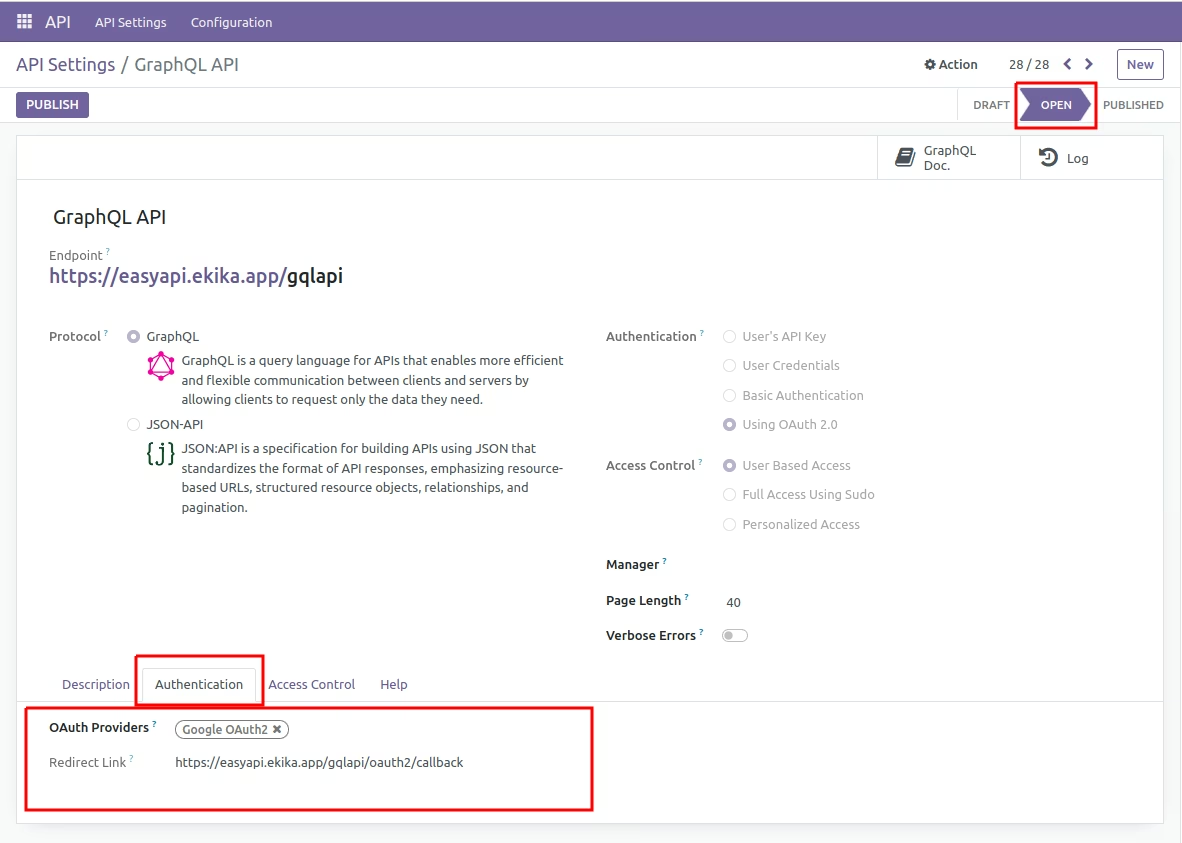
- First, client register redirect-uri, which is provided in api record form, to its respected provider.
- Client has to made request to "/<api>/oauth2/provider/authorize" with its client_id in request-body(json), which returns authorization_url in json-body from response.
- When client use this authorization_url, client has to authorize with its respected user, after successful authorization server returns token information.
Which includes: - access_token, refresh_token, expires_in, expires_at, scope, token_type, id_token. Note: This differs from provider to provider.
- db, login
- If client wants to refresh the token & get access-token then made request to "/<api>/oauth2/token" with its client-id, client-user-identity in request-body(json), which returns new token related information.
- If client wants to revoke the token then made request to "/<api>/oauth2/revoke" with its client-id, client-user-identity in request-body(json), which revoke the token from authorization server and also delete the client api user record.
API Resource Access Steps:
- When client want fetch api data using oauth2 method, made http-request using header:
Authorization: Bearer access_token_value - If access_token is valid then it return response data and if access_token is invalid then client has to refresh the token or authorize the user again.
Python Request Examples:
1. Client Authorization:
import requests import json url = "https://easyapi.ekika.app/jsonapiext/oauth2/provider/authorize" payload = json.dumps({ "client_id": "YOUR_CLIENT_ID", "client_user_identity": "YOUR_UNIQUE_CLIENT_IDENTITY" }) headers = { 'Content-Type': 'application/json' } response = requests.request("GET", url, headers=headers, data=payload) print(response.text)
2. Refresh Token:
import requests import json url = "https://easyapi.ekika.app/jsonapiext/oauth2/token" payload = json.dumps({ "client_id": "YOUR_CLIENT_ID", "client_user_identity": "YOUR_UNIQUE_CLIENT_IDENTITY" }) headers = { 'Content-Type': 'application/json' } response = requests.request("POST", url, headers=headers, data=payload) print(response.text)
3. Revoke Token:
import requests import json url = "https://easyapi.ekika.app/jsonapiext/oauth2/revoke" payload = json.dumps({ "client_id": "YOUR_CLIENT_ID", "client_user_identity": "YOUR_UNIQUE_CLIENT_IDENTITY" }) headers = { 'Content-Type': 'application/json' } response = requests.request("GET", url, headers=headers, data=payload) print(response.text)
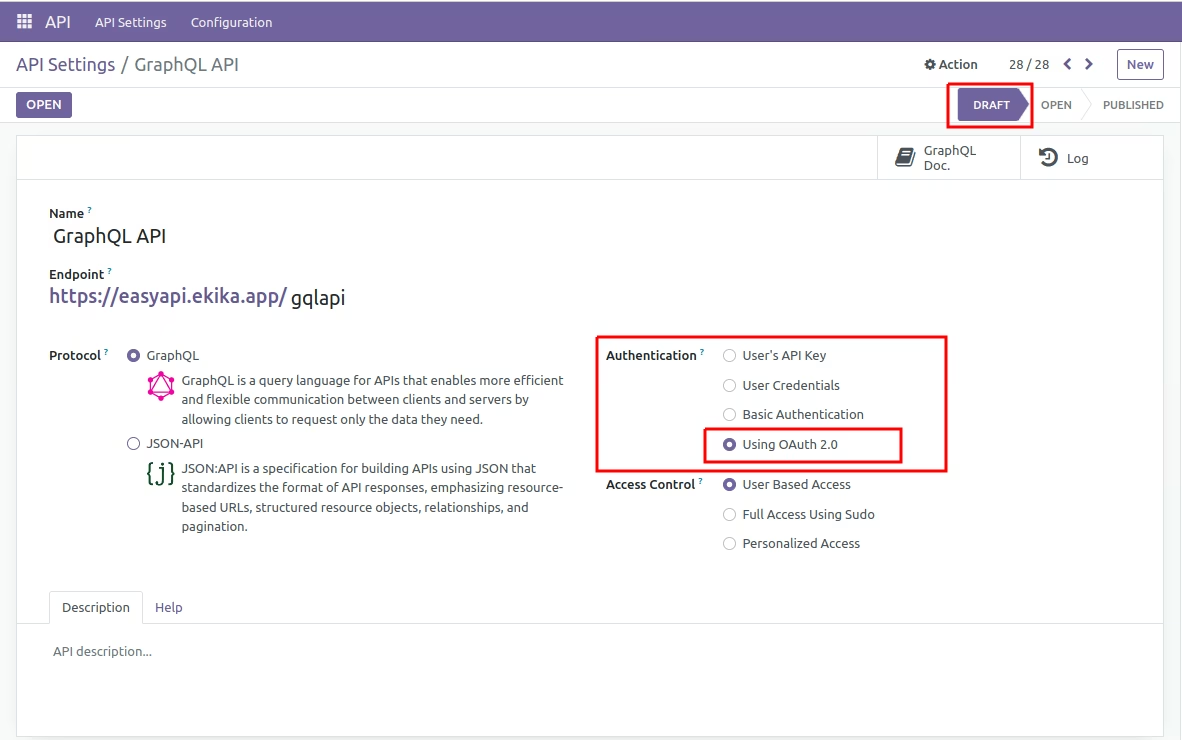
 Configuring API OAuth2 Authentication