The Advanced Session Management module for provides administrators with comprehensive tools to monitor and manage user sessions. This module enables the tracking of user activities, auditing of login sessions, and the receipt of real-time login notifications. By integrating these features, businesses can enhance system security, ensure compliance, and maintain a transparent record of user interactions within the Odoo platform.
Key Features
User Activity Audit: Monitor and log all user activities within the system for accountability and compliance.
Login Session Tracking: Keep track of active and past user sessions to identify unauthorized access.
Real-Time Login Notifications: Receive immediate alerts upon user login or logout events to stay informed of system access.
Session Duration Monitoring: Analyze the duration of user sessions to detect unusual activity patterns.
IP Address Logging: Record the IP addresses from which users access the system for security analysis.
Access Time Tracking: Monitor the times at which users log in and out to identify potential security risks.
User Role Identification: Determine the roles of users during each session to assess access levels.
Session Termination Control: Administrators can terminate sessions remotely to prevent unauthorized access.
Audit Trail Export: Export session logs and activity reports for external analysis or record-keeping.
Customizable Notification Settings: Tailor login notification preferences to suit organizational needs.
Benefits
Enhanced Security: Monitor user sessions to detect and prevent unauthorized access.
Compliance Assurance: Maintain detailed records of user activities to comply with regulatory requirements.
Operational Transparency: Gain insights into user behavior and system access patterns.
Proactive Risk Management: Identify and address potential security threats before they escalate.
Improved System Integrity: Ensure that only authorized users have access to sensitive information and resources.


User activity audit (Advanced)
Track every user's activities, operations & sessions of the system
This Module Allows privileged users to track all the operations (such as read, create, modify, and delete) performed on Data Models by the users & all their running sessions. And trace back the session on which any particular activity is performed. And also if any suspicious session started, the user can track down the activities (such as record read, create, update & delete) with a complete audit trail. And kill that session to force logout the malicious user. This module will kill the user's sessions after a specified time duration if defined in configuration settings. This module will automatically notify the respective users by mail of any new login.
Features

User Activity Audit
Easy to track the operations like read, create, update and delete performed by the internal users in system for any modules and any fields.

Session Management
Easy to track all the individual sessions started by internal users with ip and location.

Automatic Activity Recording
Every user's activity will be automatically recorded in the system and will be linked to sessions. No configurations are required.

Meaningful user activity logs
Detailed informatic logs of every operation of necessary modules only. Unnecessary module logs will be discarded automatically.

Session Information
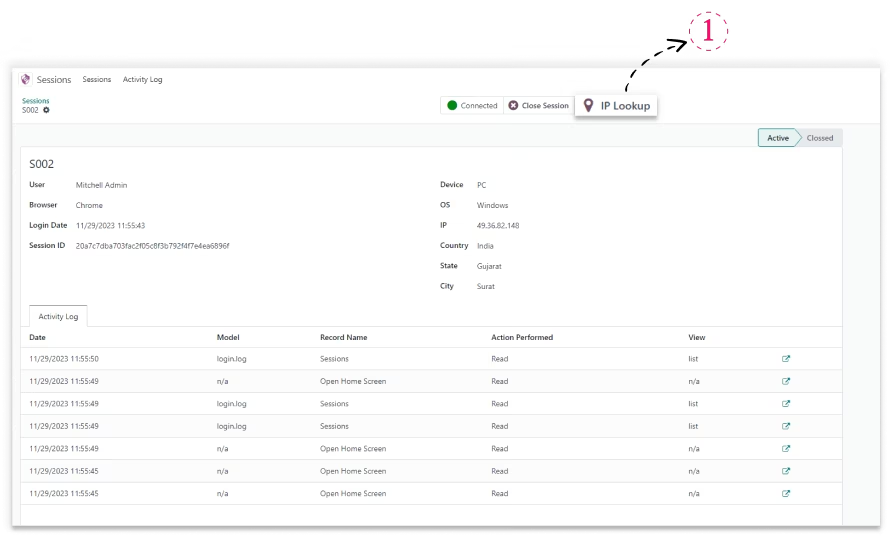
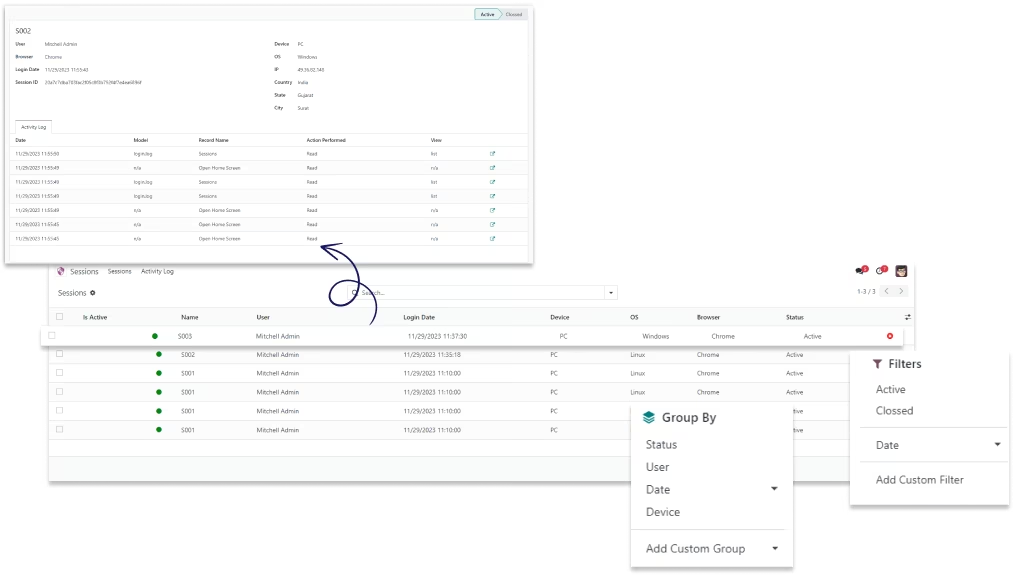
Users can see the information of any session like IP, date, device, location, os & browser. Also, the activities performed during that session.

Manage with Access rights
Admin can manage all the sessions while the user has access to only their sessions.

Quick Notification
Users will get an instant email notification if any new sessions start to alarm the users.

Kill any Session
Users can easily kill their running sessions with just one click.

Track all models
Advanced User Audit can help to track all models including third-party models.

Module requires 'user-agents' python module to be pre-installed.
user@User:~$ sudo pip3 install user-agents
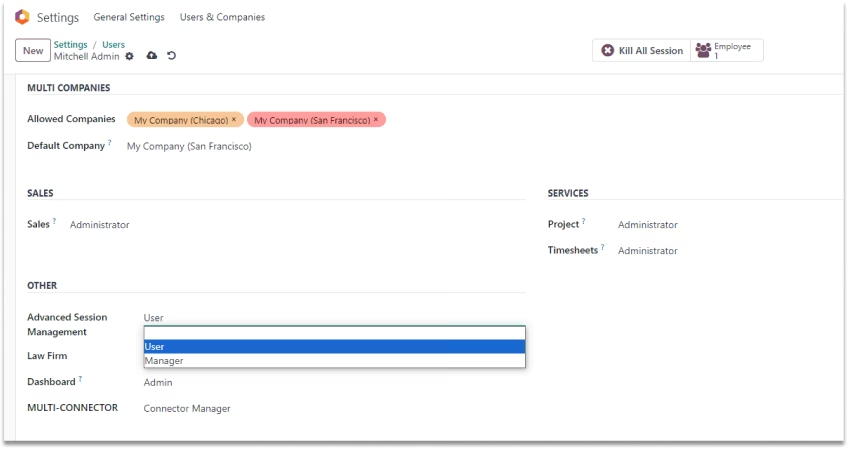
: User can only see their session and logs.
: Managers can see all user's sessions and audit Logs.

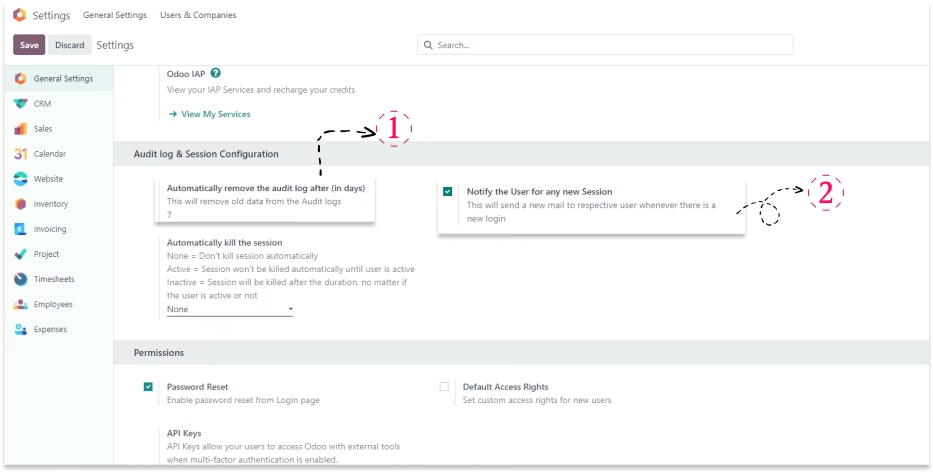
Setting to auto remove the trace logs after certain period.

This wills send an automatic email whenever there is a new login by any user.
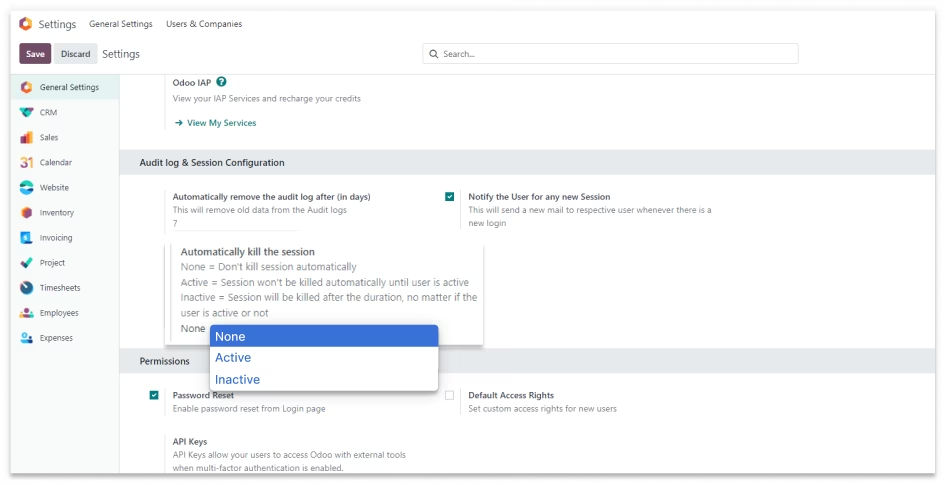
: Don't kill any session automatically.
: Session won't be killed automatically until user is active.
: Session will be killed after the duration, no matter if the user is active or not.

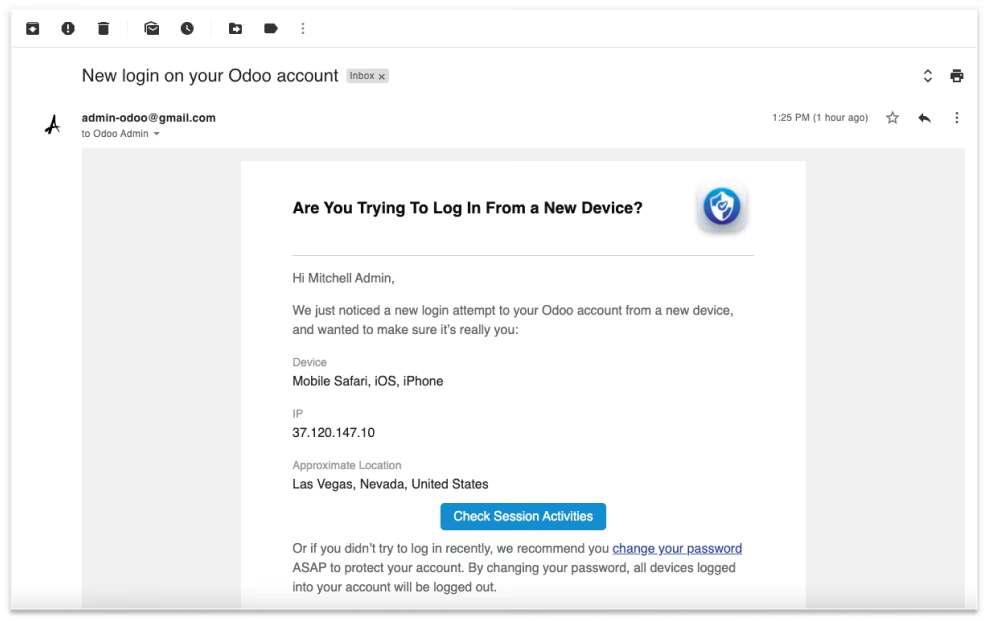
New Login Email Notification
When new login in other device than this module will send email notification to the login users email
address with device specification, IP address, and location.

Sessions
Open the 'Sessions' menu to view the Sessions. The manager will be able to view all the sessions.
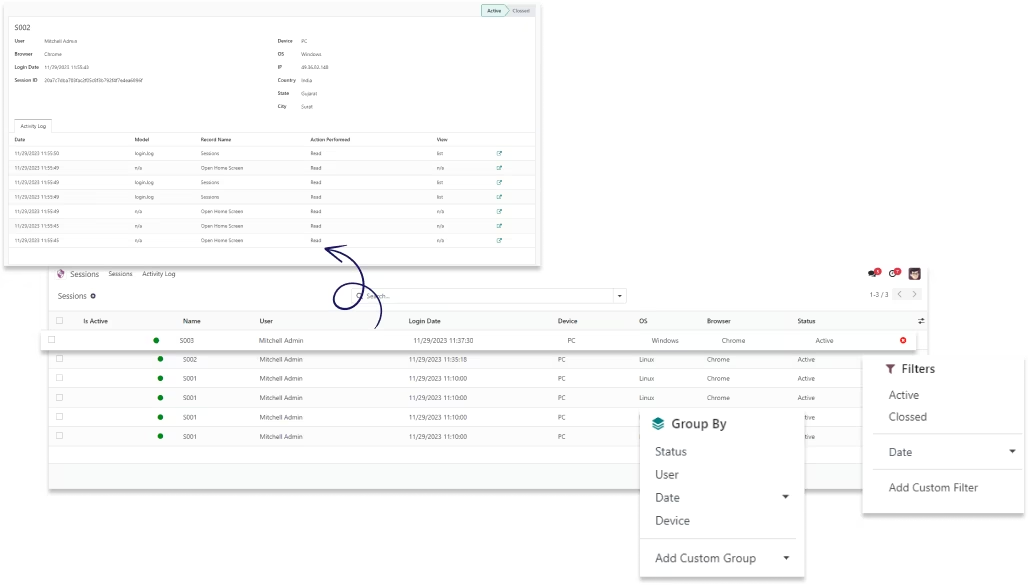
Track user's login date and time with bd-flexser name.
Track real time location, ip address and system specification of user.

Track user activities like reading, writing, and deleting in any model.

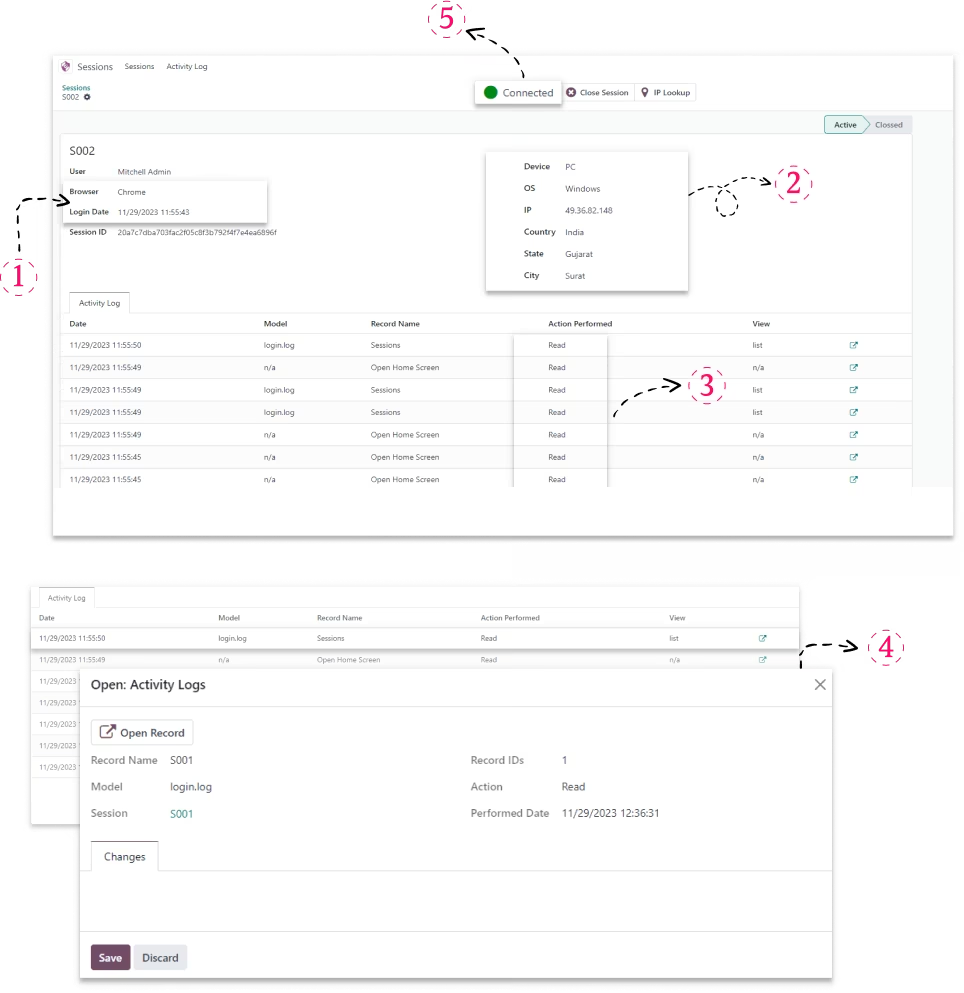
Shows detailed information of user's activity in activity logs, shown in the below screens.

Button with green color shows that user is currently active. If inactive than there
will be red color with offline label.
If the user won't perform any activity for 5 minutes than the button will become red from green.

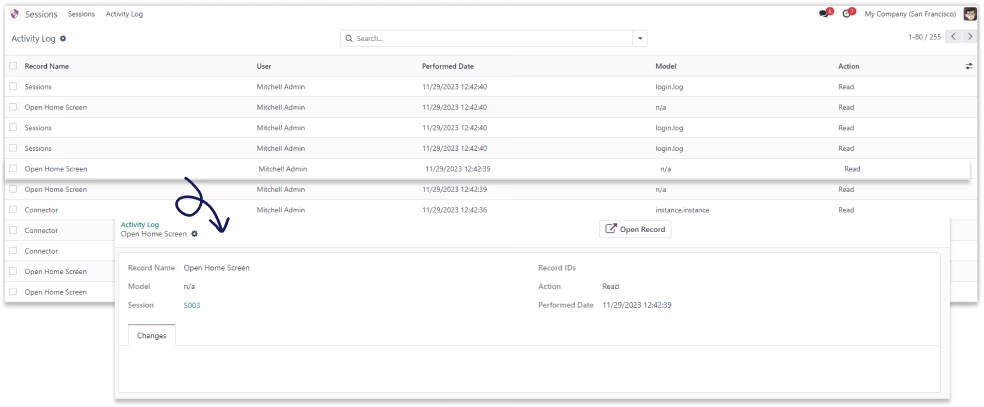
Activity Log
Open the 'Sessions' menu to view the Sessions. The manager will be able to view all the sessions.
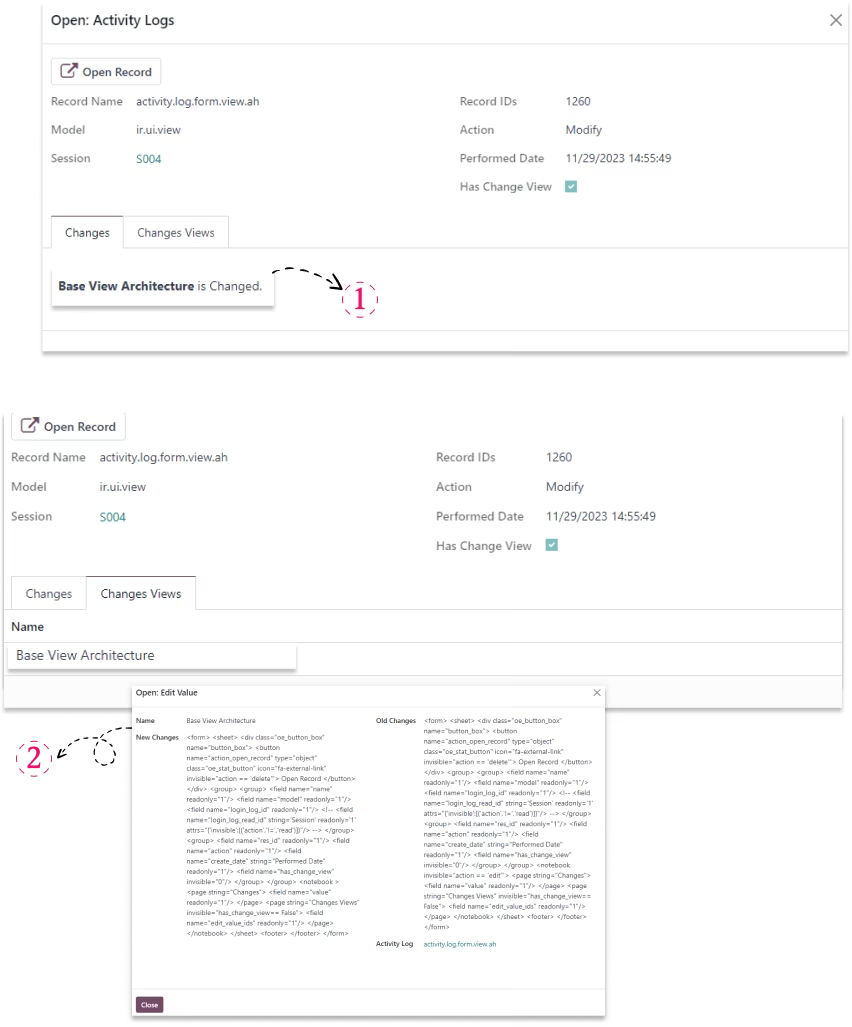
Shows view changes if a user makes changes in any view.
Shows the detailed information of users activity. like if user did changes in any views or
modify record. Also shows what changes are before and after.
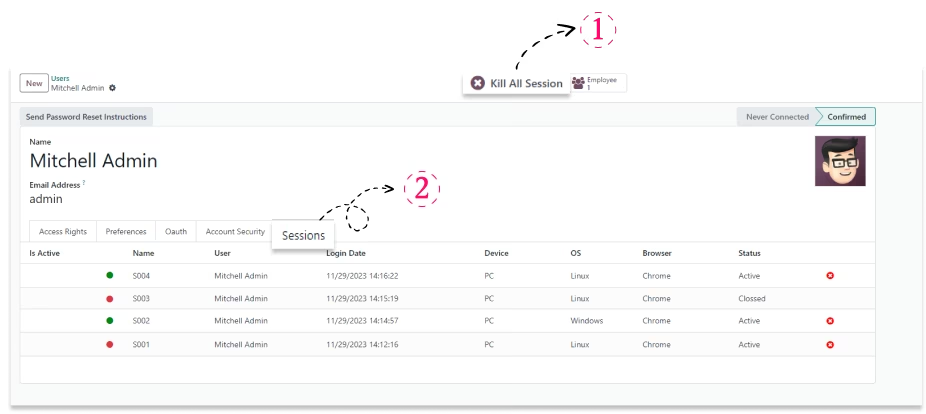
User can kill their all sessions by clicking on the 'kill all session' button.
All session activity is shown in the user's form view session tab. Shown in below screen.
The location is derived from free API. To know the exact location click this button
and it will redirect to the 3rd party IP location website.